If you're on a fast-moving team, you know the drill. You're trying to push a release, but the pipeline is blocked by a failing end-to-end test. The culprit? A tiny, seemingly harmless UI tweak. This endless cycle of fixing brittle, code-based tests is a familiar pain that eats up countless engineering hours.
With no-code E2E testing, there’s a better way. You can describe what a user needs to do in plain English, and an AI agent handles the rest, executing the journey flawlessly in a real browser. It’s a huge step up from rigid scripts that shatter every time a button’s colour or ID changes.
Moving Beyond Brittle Test Scripts

For so many development teams, the pre-release ritual is agonisingly predictable. A critical E2E test, probably written in a framework like Cypress or Playwright, suddenly fails in the CI pipeline. After some digging, you find the cause: a developer updated a button’s CSS class.
This kicks off a frustrating cycle of debugging, updating selectors, and re-running the build, all while a critical release is held up. These "brittle" tests are a massive drag on productivity, turning quality assurance into a bottleneck instead of a safety net.
The Problem with Traditional Scripts
The root of the problem is how traditional, code-based test scripts work. They are built on a foundation of explicit, step-by-step instructions. They rely on fragile selectors—like specific CSS classes or XPaths—to find and interact with elements on a webpage.
In an agile world where your application’s code is constantly changing, these selectors are guaranteed to break. This creates a high-maintenance burden that only gets worse as your product grows.
It’s like giving a robot a hyper-detailed map to get through a building. If a single door is moved or a hallway is blocked for maintenance, the robot is completely lost. Its mission fails. This is exactly what happens when skilled engineers have to spend their valuable time fixing tests instead of building new features.
A Smarter Approach to E2E Testing
Modern no-code E2E testing offers a fundamentally different path forward. Instead of a rigid map, it's like giving that robot a clear goal and the intelligence to figure out the route on its own. This approach uses AI to understand the intent behind a test, not just the literal, step-by-step mechanics.
By focusing on the user's goal—like 'find the most expensive laptop and add it to the cart'—no-code AI tools can adapt to UI changes, navigate dynamic content, and successfully complete the test even when element attributes have changed.
This shift has huge implications for how teams think about quality. You can learn more about how agentic test automation is changing the game. It allows anyone on the team, from product managers to manual testers, to create robust tests using simple, natural language. It’s a move from instructing to delegating, freeing up your team to build a resilient quality process that works with your development flow, not against it.
How No-Code E2E Testing Actually Works
Let's pull back the curtain on no-code E2E testing. Forget the complex jargon for a moment. At its core, the whole process is about translating what you want to do—your intent—into actions a browser can perform. It’s less like writing strict code and more like having a conversation with an intelligent assistant that just gets it.
Think about how you'd train a new person on your team. You wouldn't hand them a cryptic list of commands like, "Find element with CSS ID '#submit-btn-new' and execute click()." You'd just say, "Click the 'Sign Up Now' button." That’s exactly how modern no-code testing platforms operate—intuitively.
From Words to Actions
The magic behind this is a framework that turns plain English into browser actions, all thanks to Natural Language Processing (NLP). NLP is the branch of AI that gives computers the ability to read, understand, and react to human language.
When you type out a test step like, 'Log in as a new user with email "[email protected]"', the NLP model kicks into gear. It dissects that sentence to figure out the important parts:
- The Intent: What's the main goal? To "log in."
- The Actor: Who is doing this? A "new user."
- The Data: What information is needed? The email "[email protected]."
This is so much more than just a keyword search. The AI model analyses the context of your entire application to figure out what "logging in" actually means on that specific page. It intelligently finds the right input fields for an email and password, types in the data, and locates the correct button to submit the form, all without you ever needing to look at a single line of code.
Think of it as a smart assistant for your app. You just state your goal, and the AI figures out the most logical sequence of clicks, types, and checks to get it done, just like a human tester would.
This approach is becoming more and more essential. Projections show that by 2030, over 60% of new digital solutions in Australia will be built or backed by no-code/low-code platforms. This trend is a major tailwind for the adoption of no-code E2E testing, especially among startups and small teams navigating Australia's booming USD 1.7 billion software testing market. You can discover more insights about Australia's no-code development trends and their impact on testing.
The Self-Healing Advantage
One of the most significant breakthroughs here is self-healing capability. This feature directly tackles the biggest headache of traditional, code-based test scripts: brittleness.
A scripted test is incredibly fragile because it relies on fixed locators, like an element's ID or class. If a developer changes a button's colour, tweaks its text from "Submit" to "Continue," or updates its underlying ID, a Cypress or Playwright test will instantly break. The script can't find the element it was hard-coded to look for, and the test fails.
An AI-driven no-code tool, on the other hand, is far more resilient. Because it understands the goal (e.g., "submit the form") rather than just a specific element ID, it can adapt to minor UI changes on the fly. If the "Submit" button now says "Continue," the AI uses visual cues and surrounding context to correctly identify the new button and keep the test running.
This self-healing nature slashes the maintenance workload for engineering teams. Instead of spending hours fixing broken tests after every little UI update, the AI handles these adjustments automatically. For a deeper look into this topic, you can read our guide on how AI-powered E2E testing is revolutionising test automation. This means your tests stay reliable, your CI/CD pipelines keep flowing, and your developers can get back to what they do best: building an amazing product.
2. No-Code AI vs. Traditional Scripting: A Head-to-Head Comparison
So, you're weighing up a modern no-code approach against a battle-tested, code-based framework like Cypress or Playwright. It really comes down to a fundamental difference in philosophy. One path prioritises speed and accessibility, while the other offers deep, granular control but comes with a steep learning curve and a heavy maintenance burden.
Making the right choice isn't just a technical detail; it's a strategic move. It directly impacts how fast your team can ship, how you allocate your budget, and whether your engineers are building new features or constantly fixing broken tests.
This simple diagram shows how no-code platforms turn plain language into real browser commands.
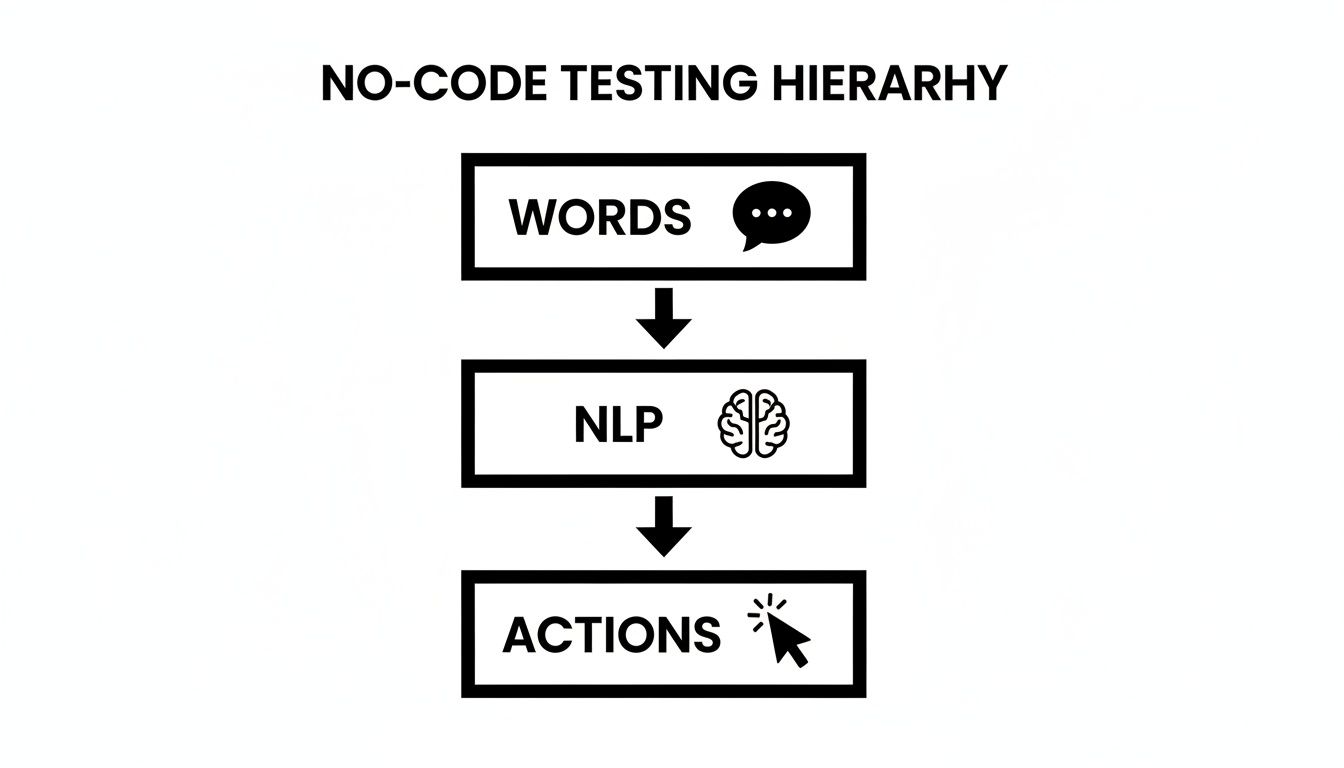
As you can see, the process flows naturally from human intent (the Words you write) through an AI interpretation layer (the NLP engine) to the final execution in the browser (the Actions). It’s all about removing the technical jargon and getting straight to the point.
To get a clearer picture of how these two approaches stack up in the real world, let's break down the key differences.
No-Code AI Testing vs Traditional Scripting
This table provides a side-by-side look at how a no-code AI platform compares to traditional scripted frameworks.
| Attribute | No-Code E2E Testing (e.g., e2eAgent.io) | Code-Based E2E Testing (e.g., Cypress/Playwright) |
|---|---|---|
| Required Skills | Plain English. Anyone can write tests. | JavaScript/TypeScript, CSS Selectors, framework APIs. |
| Who Writes Tests | Product managers, QA testers, founders, developers. | Specialised QA automation engineers, software developers. |
| Maintenance | Minimal. AI adapts to UI changes, reducing breakages. | High. Brittle selectors require constant manual updates. |
| Speed to Create | Extremely fast. Write a sentence, create a test. | Slower. Requires coding, debugging, and setup. |
| Resilience | High. Self-healing tests handle UI refactors gracefully. | Low. Small UI changes frequently break tests. |
| Setup Cost | Low. Sign up and start writing tests in minutes. | High. Requires environment setup, framework installation. |
Ultimately, the choice hinges on your team's goals. If your priority is democratising testing and moving faster, no-code is a clear winner. If you need absolute, fine-grained control and have dedicated engineering resources, scripting remains a viable, albeit costly, option.
Who Can Actually Write the Tests?
One of the biggest differences is who gets to create and manage the tests. Traditional scripting frameworks are powerful, no doubt, but they’re built for developers. You need to be comfortable with JavaScript or TypeScript, understand the DOM, and know how to wrestle with CSS selectors and framework-specific commands.
This creates an immediate bottleneck. A product manager or manual QA tester has to write up a ticket, explain the user flow, and then wait for an engineer to find time to code the test. The person who understands the feature best is disconnected from the person actually writing the test for it.
No-code E2E testing blows this model up. By using plain English, it lets almost anyone on the team build robust test suites.
- Product Managers can turn their user stories and acceptance criteria directly into tests that run in the CI/CD pipeline. No more ambiguity.
- Manual QA Testers can automate their own regression checks without ever learning to code, giving them more time for critical exploratory testing.
- Founders and Indie Developers can quickly build a safety net around their most important user journeys, ensuring the core product is always stable.
This shift does more than just save time; it embeds quality deep within the product development process, making it a shared responsibility, not just an engineering task.
The Never-Ending Story of Maintenance
The true cost of any test suite isn’t writing it; it’s keeping it alive. With code-based tools, maintenance is a constant, soul-crushing grind. Scripts are fragile because they depend on static selectors like CSS IDs or XPaths to find elements on a page. The moment a developer refactors some code or a designer tweaks the UI, those selectors break, and the tests fail.
Then the cycle begins. An engineer has to stop what they’re doing, figure out why the test failed, dig through the code to find the new selector, update the script, and push a fix. It’s a low-value, repetitive task that eats up a shocking amount of development time.
The real problem with scripted tests is that they have no idea why they’re doing something. They only know what to look for, like an element with the ID
#user-login-button.
This is where AI-powered no-code E2E testing changes the game. It understands your intent. Instead of hunting for a rigid, specific selector, the AI agent analyses the page just like a human would, looking for the element that best matches the goal, like "Click the login button."
This makes your tests incredibly resilient. If a button’s ID changes, its text is updated from “Login” to “Sign In,” or its colour is tweaked, the AI can still find it based on its function, text, and position. This self-healing ability slashes maintenance overhead, allowing your test suite to evolve with your application without constant manual fixes.
Putting No-Code E2E Testing into Practice
Theory is great, but the real power of no-code e2e testing truly clicks when you see it in action. So, let's move past the concepts and get our hands dirty. We'll explore how this approach solves actual problems for different teams by walking through three distinct, real-world scenarios.
Each example shows just how simple, plain-English commands can build a powerful safety net around the most important parts of a business. This is where the rubber meets the road, proving that robust testing doesn’t have to be some complex, code-heavy ordeal.
The SaaS Startup Securing Its Funnel
Picture a small but growing SaaS company. Their absolute lifeblood is the signup and onboarding flow. If that breaks, their entire customer acquisition funnel grinds to a halt. They need a rock-solid way to ensure new users can sign up, activate their accounts, and get that first taste of a core feature without hitting a single snag.
With no-code e2e testing, their product manager can knock out a vital test in minutes. Best of all? They don't have to pull a developer away from building the next big feature.
Example Test Flow:
- Navigate to the signup page.
- Fill in the email field with a new user's email.
- Create a secure password and enter it in the password field.
- Click the "Create My Account" button.
- Verify that the page shows the "Welcome to the dashboard!" message.
- Click on the "Create New Project" button and ensure a project is created.
Just like that, this simple test becomes a constant guardian over their most critical business process. It can run automatically after every single code change, giving the team peace of mind that they haven't accidentally broken the very first impression a new customer has.
The E-commerce Store Protecting Revenue
For any online store, the checkout process is sacred ground. A bug that stops a customer from completing a purchase isn't just an inconvenience; it's a direct hit to the bottom line. This flow is often full of tricky, dynamic elements like discount codes and shipping calculators, which can be a real headache for traditional scripted tests.
A no-code tool, on the other hand, can navigate this complexity with ease. It focuses on what the user is trying to achieve, not the specific element IDs a developer used to build the page.
This shift empowers non-technical team members to build and maintain tests that directly protect revenue. A marketing manager could even create a test to validate a new promotional code before it goes live.
Example Test Flow:
- Go to a product page for a "Leather Wallet".
- Click the "Add to Cart" button.
- Navigate to the shopping cart page.
- Enter "SUMMER20" into the discount code field and apply it.
- Verify that the order total has been reduced by 20%.
- Proceed to checkout and complete the purchase.
This test makes sure the entire commercial engine of the site is humming along smoothly—from adding items to applying discounts and finalising the payment. For a deeper dive, check out our detailed guide for more insights into the world of automated software testing.
The Indie Developer's MVP Smoke Test
Now, think about a solo founder who has just launched their Minimum Viable Product (MVP). With limited time and even more limited resources, they can't afford to get bogged down writing and maintaining complex test suites. Their biggest priority is making sure the absolute core functionality—logging in and seeing the main dashboard—is never, ever broken.
This is the perfect job for a quick "smoke test." This type of test doesn't check every little feature but gives a quick thumbs-up that the most critical paths are working after a new deployment.
Example Test Flow:
- Go to the login page.
- Log in with the username "[email protected]" and a valid password.
- Assert that the URL now contains "/dashboard".
- Confirm that the heading "Your Dashboard" is visible on the page.
- Click the "Logout" button and verify you are returned to the login screen.
In just a few lines of plain English, the developer has created an automated check that provides immense value. This simple flow gives them the freedom to push updates quickly, knowing that a fundamental part of their application is stable. This is especially vital in Australia's booming tech scene, where IT spending is forecast to reach $172.3 billion by 2026. No-code testing is helping startups multiply their automation capacity by 5 to 10 times, delivering faster cycle times and cutting infrastructure costs significantly.
Weaving No-Code Tests into Your CI/CD Pipeline
Writing the tests is just the first step. To get real value from no-code e2e testing, you need those checks running automatically and reliably, giving your team immediate feedback right where they work. This means plugging them directly into your Continuous Integration and Continuous Deployment (CI/CD) pipeline.
The goal here is to shift testing from a separate, manual stage into a seamless, automated part of your development workflow. It stops being a pre-release bottleneck and becomes a constant safety net, catching bugs the moment they’re introduced.
Thankfully, modern no-code platforms are built for this. They integrate smoothly with the tools your engineering team already uses every day, like GitHub Actions, GitLab CI, or Jenkins. This integration is what unlocks fast, actionable feedback.
Triggering Tests on Every Change
The most powerful way to use no-code E2E tests is to have them run automatically with every single code change. This usually happens on every pull request (PR) or merge request (MR), making sure no new code gets into the main branch without passing your most critical user flow tests first.
Getting this set up is surprisingly straightforward. Most no-code testing tools give you a simple API endpoint or a command-line interface (CLI) tool that you can call from your CI/CD configuration file.
A typical workflow looks something like this:
- A developer pushes a code change and opens a pull request.
- Your CI tool, say GitHub Actions, spots the new PR and kicks off its automated workflow.
- A step in that workflow makes an API call to your no-code testing platform, telling it to run a specific test suite against a preview or staging environment.
- The platform then executes the tests in a real browser, mimicking exactly what a user would do.
This process makes quality checks an inseparable part of the development cycle, not an afterthought.
By running tests on every PR, you shift quality control "left," catching issues early when they are cheapest and easiest to fix. It stops regressions before they ever reach your main codebase.
This kind of efficiency is crucial in Australia, where there’s a chronic shortage of software engineers. Research from GitLab shows that 82% of Aussie DevSecOps professionals see AI-driven tools as a way to "create" more engineers by speeding up workflows. For DevOps engineers, a seamless CI/CD integration without fragile scripts is a massive win, especially in a market where Gartner predicts 70% of new apps will use these technologies by 2025. You can discover more insights about how intelligent orchestration unlocks AI's promise.
Getting Feedback You Can Actually Use
Once the tests are done, the results have to get back to your team in a way that's clear and easy to act on. This is where webhooks are brilliant. You can set up your no-code testing tool to send a notification straight back to your CI/CD platform with the test results.
This feedback loop lets you make the test run a required status check on the pull request. So, if the E2E tests fail, GitHub or GitLab can automatically block the merge, preventing buggy code from ever being deployed.
It creates a powerful gatekeeping mechanism. The results pop up directly in the pull request, often with links to detailed reports, screenshots, and even video recordings of the failed test run. This makes it incredibly easy for developers to see exactly what went wrong and fix it fast.
Your Roadmap for Moving to No-Code Testing
Thinking about swapping out your fragile, code-heavy test suite for a modern no-code approach can feel daunting. I get it. The good news is, you don’t have to throw everything out and start over. A gradual, phased migration lets you bring in all the benefits of no-code e2e testing without blowing up your current workflow.
The trick is to start small, show that it works, and then expand from there. This way, you build confidence and get your team on board while your existing quality gates keep humming along. Let's walk through a simple, three-phase roadmap to make this transition a smooth one.
Phase 1: Nail Your Most Critical User Path
First things first: don’t try to convert every single test right away. That’s a recipe for chaos. Instead, pick the single most important journey a user takes in your application. For a SaaS company, that’s probably the sign-up and onboarding flow. For an e-commerce site, it’s the journey from adding a product to the cart all the way through to a successful checkout.
Now, build out just that one critical path using your no-code testing tool. Since you're essentially just writing out the steps in plain English, this should be quick—maybe a few minutes. Then, run this new test alongside your old, scripted version. This side-by-side comparison is a brilliant, low-risk way to prove that the no-code test is just as reliable and effective.
The goal here isn’t about replacing anything yet; it’s about verification. By running both tests in parallel, you’re building a rock-solid case that this new approach actually works, making it much easier to get the rest of the team excited.
Phase 2: Systematically Expand Your Test Coverage
Once you’ve seen your critical path test run successfully a few times, it’s time to move into the expansion phase. The strategy here has two parts: tackle new features first, and then start replacing those frustrating legacy tests that always seem to break. This approach adds immediate value while you slowly chip away at existing technical debt.
Stick to these two simple rules for expansion:
- New Features Get New Tests: Make it a rule that all end-to-end tests for new features must be built on the no-code platform. This immediately stops the pile of brittle scripts from getting any bigger and shows the team just how much faster this new way is.
- Target the Pain Points: Dive into your CI/CD logs. Which of your old, scripted tests are the flakiest? You know the ones—they fail constantly and soak up hours of debugging time. Convert those high-maintenance tests next. Every one you replace is a direct win, freeing up engineering time for more important work.
Phase 3: Empower the Whole Team and Say Goodbye to Old Scripts
The final phase is all about making no-code e2e testing the new standard across your organisation. As your no-code test suite grows and continues to prove its reliability, you can confidently start decommissioning the old, scripted tests they’ve replaced. This is a vital step—it gets rid of redundant work and clears up any confusion about which test is the source of truth.
With a solid suite of no-code tests in place, you can finally bring everyone into the fold. It's time to train your product managers and manual QA testers to write and maintain tests for their own feature areas.
To keep things manageable as your test suite grows, organise your tests logically. Group them by feature or user journey, like "Authentication Tests" or "User Profile Management". This simple structure makes the suite easy for anyone to navigate, turning quality assurance from an engineering bottleneck into a true team sport.
Common Questions About No-Code E2E Testing
Even with all the clear upsides, it’s only natural to have a few practical questions before jumping into a new way of testing. Let's tackle some of the most common concerns we hear about no-code E2E testing to help you figure out if it's the right move for your team.
How Does It Handle Dynamic Content?
This is a big one. Traditional scripts are notoriously brittle because they rely on rigid selectors like XPath or CSS IDs. If a developer changes an ID or a label, the test breaks.
Modern AI-powered tools are much smarter. They don't just look for a specific ID; they use visual analysis and contextual clues to understand what an element is. So, if a button's text changes from 'Submit' to 'Continue,' or it moves to a different spot on the page, the AI can still find it based on its function and appearance. This makes your tests far more resilient to the small UI changes that happen every day.
Can This Replace Our Cypress Suite?
For the vast majority of your user-facing, browser-based tests, the answer is a resounding yes. But nobody expects you to flip a switch overnight. The smartest approach is a gradual migration.
Start by rebuilding your most critical user journeys as no-code tests. Once you see how stable and easy they are to maintain, you can commit to creating all new tests on the no-code platform. Over time, you can slowly phase out the old, brittle Cypress scripts as they become redundant.
You'll likely want to keep some highly specific, code-based tests for deep technical integrations, but your entire browser-based E2E suite can be effectively replaced. The reduction in maintenance time alone is often worth it.
Is This Really for Non-Technical People?
Absolutely. In fact, that's one of its greatest strengths. By using plain English to define test steps, you effectively democratise the testing process.
Imagine your product managers writing tests that directly mirror the acceptance criteria for a new feature they designed. Or your manual QA team finally being able to automate their regression checks without needing to learn a programming language. It brings quality assurance closer to the business logic, right where it belongs.
Stop wasting time on brittle scripts. With e2eAgent.io, you just describe your test in plain English and our AI agent handles the rest. Start testing smarter today.