Does this sound familiar? Your CI pipeline is glowing red, and it's not a critical bug that broke the build. It's another flaky Cypress or Playwright test that failed because someone tweaked a CSS class or changed the text on a button.
For startups and small teams moving at a breakneck pace, this is more than just an annoyance—it's a serious drag on productivity. E2E AI offers a way out of this cycle, moving away from brittle, code-heavy scripts and towards simple, human-readable instructions. It's a completely different way to think about and execute end-to-end testing.
A Smarter Approach to End-to-End Testing
The constant grind of writing, running, and then fixing fragile end-to-end tests is a huge bottleneck for small engineering teams. Every minor UI update—changing a button's label, adjusting a selector—can shatter an entire test suite. This brittleness forces developers into a high-maintenance workflow that eats up hours that could have been spent on building new features. It’s a resource drain that turns innovators into test mechanics.
Traditional test scripting is like giving a robot a hyper-specific blueprint to walk through a building. If a single door moves an inch or a hallway gets a new coat of paint, the robot freezes, unable to adapt. The instructions are too rigid because they lack any real understanding of the mission's goal.
The E2E AI Philosophy
E2E AI completely flips this philosophy on its head. Instead of writing that rigid, step-by-step blueprint, you're now giving simple, goal-oriented instructions to an intelligent assistant that actually understands what you're trying to achieve.
Think of it like this: you stop writing code like
cy.get('.signup-button-new').click(). Instead, you just write, 'Sign up a new user with the email "[email protected]" and confirm their welcome email.' The AI agent figures out how to accomplish that, just like a human would.
This "plain English" approach frees developers from the soul-crushing cycle of script maintenance. The AI agent doesn't care if a button's ID changes because it's focused on the user's ultimate goal, not the underlying implementation details. For fast-moving teams, this shift brings immediate and obvious benefits:
- Reduced Maintenance Overhead: Stop fixing tests every time the front-end code changes.
- Increased Development Speed: Developers can focus on building the product, not debugging test scripts.
- Improved Test Reliability: Say goodbye to false positives in your CI/CD pipeline caused by trivial UI tweaks.
- Greater Accessibility: Product managers, QAs, and even non-technical founders can write and understand test scenarios in plain language.
By embracing an e2e ai strategy, teams can build a far more resilient and meaningful test suite that genuinely reflects how users interact with the application. To get a better handle on the fundamentals, you can learn more about end-to-end testing in our detailed guide. Ultimately, this new model lets you ship features faster and with a whole lot more confidence.
How AI Agents Understand and Test Your Application
So, how does a simple, plain-English sentence like "add a product to the cart and checkout" actually turn into a series of clicks and keystrokes in a real browser? The magic behind E2E AI isn't a single silver bullet. Instead, it’s a clever combination of different AI models all working together. It’s less about writing code and more about genuine comprehension.
Think of it like telling a self-driving car where to go. You don't instruct it to "turn the wheel 15 degrees left" or "apply 30% pressure to the accelerator." You just give it a destination. The car then uses its sensors and intelligence to figure out the rest. An AI testing agent operates on a very similar principle, blending language, vision, and action to get the job done.
This diagram shows the evolution perfectly—from fragile, hard-coded scripts to intelligent agents that just get what you mean.
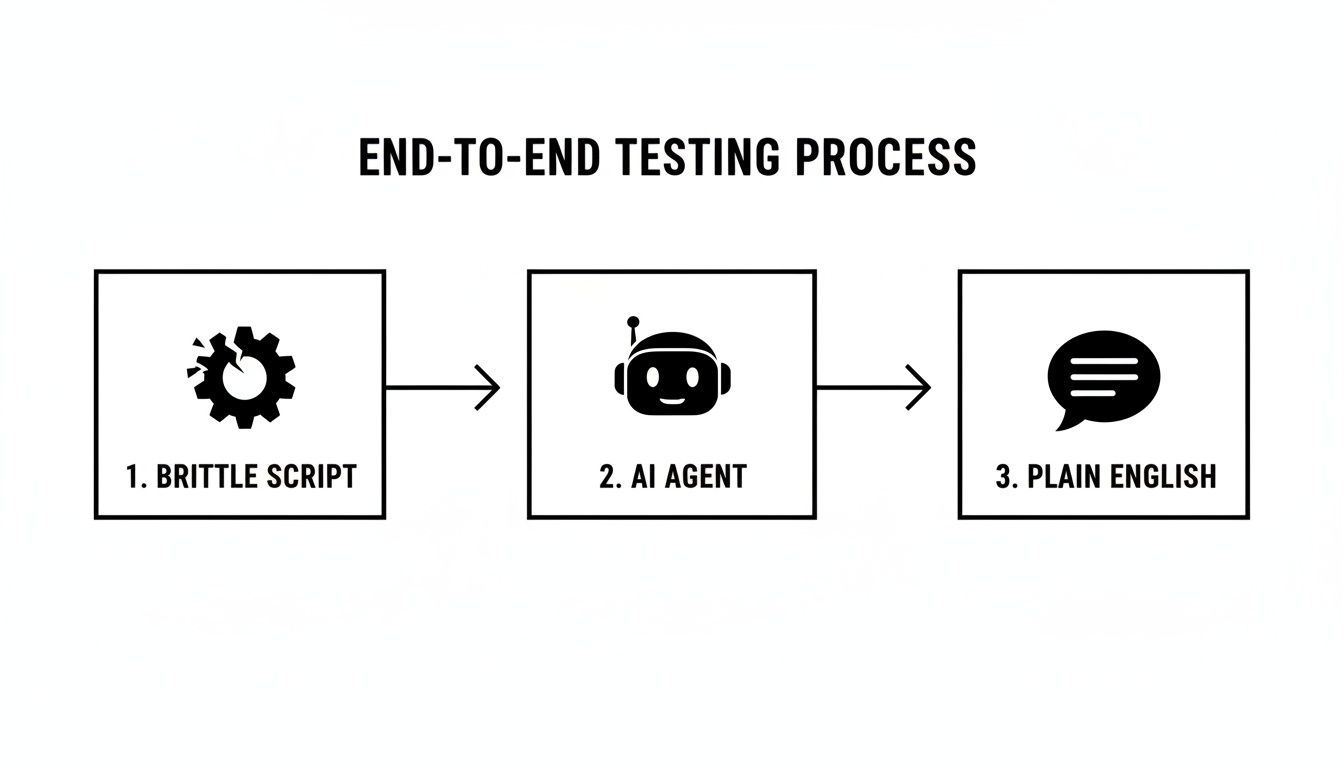
This shift fundamentally changes test creation. It moves from a brittle coding exercise to a straightforward instructional task, opening up testing to more people on your team.
The Three Core Components of an AI Agent
The whole process can be broken down into three key phases that work in harmony to run your test. Each step builds on the last, creating a solid understanding of both your goal and what's happening on the screen.
Natural Language Processing (NLP): Deconstructing Your Command First up, a powerful language model—similar to what’s under the hood of ChatGPT—analyses your instruction. It figures out the core intent, identifies key details (like usernames or product names), and maps out the required sequence of actions. It’s a bit like a translator, turning your "what" into a structured plan.
Computer Vision: Seeing the UI Like a User Next, a vision model takes a real-time snapshot of your application's user interface. Here’s the crucial bit: it doesn't care about brittle CSS selectors or element IDs. Instead, it sees the screen visually, just like a person would. It identifies buttons, input fields, and links based on their appearance, label, and context.
The AI Driver: Taking Action in the Browser Finally, an AI 'driver' pulls everything together. It knows the goal (thanks to NLP) and understands the current layout of the page (from computer vision). With that information, it decides on the best next step, whether that’s clicking the most logical "Add to Cart" button or typing text into the correct form field to progress the test.
This multi-layered approach is the secret to its resilience. If a developer changes a button's colour or tweaks its label, the AI agent can still figure out what it's for because it understands the overall goal. A traditional script would break instantly. This is what makes your entire test suite far more robust and reliable.
Why E2E AI is a Game Changer for Small Teams
If you're part of a fast-moving startup, you know the pain. Every hour a developer spends wrestling with a broken test script is an hour they’re not building the actual product. Traditional end-to-end testing, while essential, can easily become a major bottleneck.
This is where E2E AI completely changes the game. It turns testing from a high-maintenance chore into a genuine competitive edge, and this is especially true for small teams that can't afford to waste time or resources.
The biggest win is a massive boost to your development speed. Instead of getting bogged down writing and debugging fragile selectors in tools like Cypress or Playwright, your team can just describe user journeys in plain English. This simple shift drastically cuts down the time spent on test creation, letting you ship new features much faster and with a lot more confidence.
Better still, this approach gets the whole team involved. Product managers and manual testers can now write and contribute to the automation suite without learning to code. They can finally create tests that perfectly match user stories and acceptance criteria, helping build a real culture of quality across the entire company, not just within the engineering silo.
A Direct Comparison
To see just how different the two approaches are, let's put them side-by-side.
| Aspect | Traditional Scripts (Playwright/Cypress) | E2E AI Agents |
|---|---|---|
| Test Creation | Requires coding expertise to write scripts with specific locators (#id, .class). |
Write test scenarios in plain English, describing user actions. |
| Maintenance | High. A small UI change (e.g., button text, element ID) breaks the test. | Low. The AI adapts to minor UI changes, as it understands the intent. |
| Who Can Contribute? | Primarily developers and specialised QA automation engineers. | Anyone: developers, product managers, manual testers, etc. |
| Speed | Slow to write and debug. Flaky tests often slow down CI pipelines. | Very fast to write. More resilient tests lead to faster, more reliable builds. |
| Setup & Learning Curve | Steep. Requires learning a framework, selectors, and best practices. | Minimal. If you can describe a user flow, you can write a test. |
The takeaway is pretty clear: AI-driven testing isn't just an incremental improvement; it’s a fundamental shift in how teams can approach quality assurance.
Unlocking Resilience and Reliability
One of the biggest headaches with old-school test automation is how brittle it is. A tiny UI tweak—like a developer changing a button's text from 'Submit' to 'Continue'—can instantly break a test and set off false alarms in your CI/CD pipeline. Your DevOps crew then has to drop everything to investigate a failure that isn't even a real bug.
E2E AI agents are built to handle this. Because they understand the intent behind a test, they can intelligently adapt to these small, everyday changes.
An AI agent is looking for "the main button to submit the form," not a rigid element with an ID of
#submit-btn-v2. This adaptability means fewer flaky tests, more reliable builds, and a CI/CD pipeline your team can actually trust.
This shift isn't happening in a vacuum. Businesses everywhere are moving past just experimenting with AI and are now adopting production-ready systems that deliver real value. In Australia, for instance, AI spending is projected to blow past AUD 6 billion by 2026, mostly driven by tools that offer tangible productivity gains.
In fact, companies that adopt generative AI early are already reporting an average productivity bump of 22.6%. That's a number that should resonate with any small team trying to punch above its weight.
Making Advanced Automation Accessible
At the end of the day, E2E AI makes robust test automation accessible to everyone. It completely lowers the barrier to entry, allowing indie developers and small SaaS teams to build a solid testing strategy that, until recently, was only realistic for large organisations with dedicated automation engineers.
This accessibility frees you up to focus on what really matters: building an amazing product that your users love. You can do it all while knowing your quality assurance process is both powerful and efficient. To dig a bit deeper, check out our complete guide on AI-based test automation.
Practical Use Cases for E2E AI Testing
Theory is one thing, but seeing how E2E AI handles real-world tests is where it really clicks. Let's move past the concepts and look at some concrete examples where these AI agents shine, turning abstract ideas into something you can actually use.

These scenarios show just how easily simple, human-readable commands can become powerful automated tests. It makes the whole approach feel much more accessible, whether you're a seasoned developer or just getting started.
Testing Critical User Journeys
First and foremost, e2e ai is perfect for validating your core user flows. We're talking about those make-or-break interactions that directly affect your customers and your bottom line. With an AI agent, testing these journeys is surprisingly straightforward.
User Registration and Onboarding:
- Plain English Command: "Navigate to the signup page, create a new account for '[email protected]' with the password 'SecurePassword123!', and verify that the user is redirected to the dashboard."
- How the AI Agent Executes: The agent finds the signup link just like a person would. It then looks for fields labelled "email" and "password," fills them in, clicks the submit button, and then scans the next page for clues it's on the dashboard, like a "Welcome" message.
Complex E-commerce Checkout:
- Plain English Command: "Add the 'Fleece Jacket' to the cart, proceed to checkout, enter shipping details for an address in Sydney, and confirm the order total is correct."
- How the AI Agent Executes: It spots the "Fleece Jacket," clicks "Add to Cart," and follows the checkout prompts. When it sees an address form, it fills it out, and on the final page, it reads the order summary to check the price.
The real beauty here is that you don't need to specify a single CSS selector or element ID. The AI agent understands the context of the user's goal, making the entire test more resilient to minor UI changes.
Validating Data and Assertions
It's not just about clicking around. AI agents can also perform crucial checks to make sure your app is actually doing what it's supposed to do. This is how you verify that an action produced the right outcome.
Verifying Success Messages:
- Plain English Command: "Fill out the contact form with a sample message and verify a 'Thank you for your message!' notification appears."
- How the AI Agent Executes: After submitting the form, the agent simply scans the screen for that exact text. If it finds it, the test passes. Simple.
Checking Data in a SaaS Dashboard:
- Plain English Command: "Log in, navigate to the 'Analytics' section, and ensure the 'Total Users' count is greater than 100."
- How the AI Agent Executes: The agent logs in, finds the analytics link, identifies the "Total Users" metric, pulls out the number, and then performs the quick comparison you asked for.
This move towards natural language aligns with what’s happening across the industry. In Australia, for example, AI adoption among small and medium businesses is predicted to jump to between 64% and 84% by 2026. Businesses are desperate to automate tasks and get more done with limited resources—the exact problem that tools like e2eAgent.io are built to solve. You can read more about these AI adoption trends for Australian businesses.
Ultimately, these practical use cases show how any team, technical or not, can start building reliable automated tests today.
Know the Limits: Where E2E AI Currently Stands
As exciting as E2E AI is for testing, it's not a silver bullet for every problem. It's a powerful new tool in your arsenal, but like any tool, it has its limits. Knowing where it shines and where you might need a different approach is key to getting the most out of it and setting your team up for success.
For starters, AI agents can sometimes get tripped up by highly unusual or custom-built UI elements. Imagine trying to test a sophisticated, canvas-based design tool like Figma or a game running on WebGL. These don't rely on the standard HTML building blocks that most websites use, which can make it tough for an AI's vision model to figure out what's clickable and what's not.
Another thing to keep in mind is pixel-perfect visual testing. An AI agent is brilliant at making sure your app works—that a user can sign up, add an item to their cart, and check out. It's not really designed to spot a 2px alignment shift in a button or a tiny variation in your brand's official hex colour. For that level of visual precision, dedicated visual regression tools are still your best bet.
Working Around the Challenges
The trick is to play to the AI's strengths. Understanding its boundaries helps you create smarter test prompts and find effective workarounds. The secret sauce is being crystal clear and specific in your instructions, especially when you're dealing with a complex part of your application.
A vague instruction like "Check the chart" leaves a lot of room for error. A much better prompt would be: "Verify the bar chart for 'Monthly Recurring Revenue' shows a value greater than $10,000 for June." The more specific you are, the more reliable your results will be.
This is actually a natural fit for how we're all starting to interact with technology. It turns out Australians are leading the world in this, averaging 1.42 AI search queries per person. We’re getting used to asking for what we want in plain English. This trend is perfect for product teams, as you can describe a test just like you'd ask a question to ChatGPT, and the AI agent will run it in a browser. You can dig deeper into this shift in this analysis of Australia's search future.
So, what happens when a test fails? It’s not a dead end. You simply watch the video recording of the test run, see where the AI got confused, and tweak your prompt to be clearer next time. Think of E2E AI less as an infallible robot and more as a very capable junior tester—it's a powerful partner that thrives on clear direction.
How to Integrate E2E AI into Your Workflow
Bringing E2E AI testing into your team doesn't have to mean tearing up your existing processes. For startups and small teams, the transition can be surprisingly smooth and deliver value almost immediately. The trick is to start small. Pick one critical user journey, get it working, and expand from there.
Your first move is choosing a platform that fits your team. You'll want something with clear, easy-to-follow documentation and a command-line interface (CLI) that can slot right into your existing development loop. The aim should be to go from writing your first plain-English test to seeing it run in minutes, not days.
Designing Your First AI-Driven Test
With a tool selected, it's time to write your first test prompt. This is less about code and more about clear communication. Think of it like giving instructions to a new hire who has never laid eyes on your app before. Be direct and leave no room for guesswork.
The user signup flow is often the perfect candidate for a first test. It's a critical path, but it's also usually quite linear.
- A bad prompt: "Test the signup." This is way too vague.
- A good prompt: "Navigate to the signup page. Fill in the email with '[email protected]' and the password with 'P@ssword123'. Click the submit button, then check that a 'Welcome!' message appears."
The difference is specificity. When you give the AI agent a precise set of actions and a clear success condition, you massively boost the reliability and accuracy of the test. It knows exactly what its mission is.
If you're weighing up the options, our comparison of different AI testing tools can help you find the right fit for your needs.
Integrating with Your CI/CD Pipeline
The real magic happens when you connect these tests to your Continuous Integration/Continuous Deployment (CI/CD) pipeline. This is where automation truly shines. Thankfully, most modern E2E AI tools are built for this from the ground up, making setup a breeze on platforms like GitHub Actions or GitLab CI.
Here’s a quick look at what that integration typically involves:
- Install the Tool: The first step in your CI workflow file is simply installing the E2E AI tool’s CLI.
- Set Up Credentials: Your API keys or other secrets should be stored securely as environment variables in your CI/CD provider's settings.
- Run the Tests: Add a single line to your workflow that kicks off the test run. It might look something like
e2e-agent run 'Login and verify dashboard'. - Review the Results: The CLI will return a pass or fail status, which tells your pipeline whether to proceed with the build or stop. The best platforms also give you a link to a detailed report, often with a video recording, which is a lifesaver for debugging failures.
Once this is set up, every single code push automatically triggers an AI agent to verify your most important user flows. This acts as a powerful safety net, catching regressions long before they have a chance to impact your users. For teams moving fast, that kind of confidence is invaluable.
A Few Common Questions About E2E AI
When you're thinking about moving to a new way of testing, it’s only natural to have a few questions. Figuring out how something like E2E AI slots into your current setup is the first step. Here are some straightforward answers to the things we get asked the most.
Does E2E AI Replace Tools Like Cypress or Playwright?
It’s probably better to think of E2E AI as a smarter, easier alternative, not a direct one-for-one replacement. You might still keep your traditional scripts for a few highly specific, technical checks, but E2E AI is built to take over the lion's share of your user flow and business logic testing—and do it much more efficiently.
Most small teams find they can cover over 80% of their testing needs with AI agents alone. This massively reduces the time you'd otherwise spend wrestling with a fragile, code-heavy test suite.
How Reliable Are AI Agents Compared to Coded Scripts?
This really comes down to a trade-off between adaptability and rigidity. Coded scripts are predictable, which sounds great, but they're also notoriously brittle. A tiny change to the UI, like a button's text or ID, can break a test completely, filling your CI/CD pipeline with false alarms.
E2E AI agents, on the other hand, are designed to be adaptable. They understand the user's intent—what they're trying to achieve—which lets them navigate minor changes without failing.
This built-in resilience means E2E AI agents tend to produce far fewer false failures over time. Your test suite starts to feel trustworthy again, letting your team hunt for real bugs instead of constantly fixing broken tests.
Can I Actually Use E2E AI in My Current CI/CD Pipeline?
Yes, absolutely. Modern E2E AI platforms are designed from the ground up to integrate smoothly into today's DevOps workflows. They usually offer simple command-line (CLI) tools or pre-built plugins for popular CI/CD systems like GitHub Actions, GitLab CI, and Jenkins.
You can set up your pipeline to kick off test runs on every commit, just like you do now. All the results, including detailed reports and video replays of the test runs, are then sent straight back into your pipeline. You get all the visibility and control you're used to, without the headache of managing the test code yourself.
Ready to stop wrestling with brittle test scripts? At e2eAgent.io, we let you describe tests in plain English so you can ship faster with confidence. Try e2eAgent.io today and see how simple E2E testing can be.