
Natural language end-to-end testing is a fresh take on quality assurance, where you write test scenarios in plain English and let an AI handle the rest. Think of it this way: instead of painstakingly writing code for every user action, you just describe what a user needs to do, and a smart AI agent carries out the test for you.
The End of Brittle Tests Is Finally Here
We’ve all been there. The CI/CD pipeline flashes red, and everyone holds their breath, only to find a tiny UI change shattered a massive end-to-end test. It’s a story every development team knows by heart: hours wasted hunting down why a test failed, just to discover it was a simple CSS selector update. This endless cycle of writing, breaking, and fixing tests is a huge drain on productivity and a major roadblock to shipping quickly.
But what if testing wasn’t about maintaining fragile scripts? What if it was just about clearly stating what you want to achieve? That's the core idea behind natural language e2e testing. Imagine describing a critical user flow, like the entire checkout process, in a single, simple English sentence—the same way you’d explain it to a new team member.
A New Approach to Quality Assurance
Rather than coding every single click, form entry, and verification, you're essentially handing over the controls to an AI agent. This agent understands your intent and navigates your application just like a real user would. It's not just another testing tool; it's a fundamental shift in how we approach quality assurance. The goal is to make testing more intuitive, robust, and accessible to the whole team, whether you're a product manager or a manual QA tester.
This approach brings some massive benefits to the table:
- Reduced Maintenance: Tests are no longer fragile. Since the AI focuses on the user's goal, it doesn't break when you make minor UI changes.
- Increased Speed: You can get comprehensive tests written and running in minutes, not hours. This dramatically speeds up your entire development workflow.
- Democratised Testing: Anyone can contribute. Non-technical team members can write tests in plain English, ensuring your test coverage actually reflects how real people use your product.
This guide is your roadmap to shipping features faster and with more confidence. We’ll walk through how to move away from traditional, code-heavy scripts and adopt an AI-powered workflow that makes brittle tests a distant memory. If this is a new concept for you, our overview on agentic QA is a fantastic place to start.
What Is Natural Language E2E Testing?
Picture yourself assembling a piece of flat-pack furniture. If you were using traditional end-to-end (E2E) testing tools like Playwright or Cypress, it would be like programming a robot with a rigid, step-by-step manual. The robot would follow every command precisely: "Pick up screw A, insert into hole B, turn exactly three times." But what happens if screw A is slightly different, or hole B is a millimetre off? The robot stops, completely stuck.
That’s the kind of brittleness developers fight with every day. A tiny change to a button's ID can shatter an entire test suite that took hours to write.
Natural language E2E testing completely changes the game. It’s more like asking a skilled human helper to do the job by just describing the final goal: "Can you put this bookshelf together and make sure it's sturdy?" Your helper gets the big picture. They can adapt if a screw is different because they understand the intent, not just the micro-instructions.
The Core Concept Explained
At its heart, natural language testing uses AI agents to turn plain English instructions into actions a browser can perform. Instead of painstakingly writing code that targets specific HTML elements, you just write a simple sentence describing what a user wants to achieve. The AI takes it from there, figuring out your request and clicking, typing, and navigating through the application on its own.
Natural language E2E testing uses AI agents to interpret test scenarios written in plain English, execute them against a live application, and validate outcomes without brittle, code-based scripts.
This is made possible by a combination of Large Language Models (LLMs) and computer vision. The LLM understands the "what" (your command), while computer vision and DOM analysis handle the "how" by finding the right button or input field. To get a better handle on how this works under the hood, you can explore the fundamentals of AI in end-to-end testing in our detailed guide.
A Solution to a Decades-Old Problem
The search for a smarter way to test software isn't new. In the Australian software scene, for instance, the move from manual to automated testing has been a long and often painful journey. Back in the early 2000s, a staggering 85% of organisations were stuck with manual QA processes, which could chew up as much as 40% of a project's timeline.
Frameworks like Selenium came along and helped cut down the manual work, but they brought their own set of problems—namely, the endless cycle of fixing broken test scripts. In fact, studies revealed that around 70% of automated tests failed simply because of minor UI changes. For small engineering teams, that’s a massive productivity drain. You can find more insights on the evolution of generative AI in software testing.
Natural language testing tackles this head-on by focusing on what the user is trying to do, not how the page is built. It finally closes the gap between the features a product manager imagines and the code an engineer has to write, making quality a truly collaborative effort.
Coded Scripts vs Plain English Tests: What’s the Real Difference?
The best way to appreciate the leap from traditional testing to natural language is to see them in action. Let's take one of the most common, business-critical flows for any web application: a new user signing up.
This single journey—from entering details, to verifying an email, to landing on the dashboard—touches registration, email integration, and authentication. It’s a make-or-break experience for new customers, and testing it thoroughly is non-negotiable.
With a framework like Cypress or Playwright, the test script is a list of highly specific, technical commands. It tells the browser exactly what to do, step by step. This means finding the right selectors for each button and field, chaining actions together, waiting for pages to load, and writing explicit checks to prove it all worked. For anyone outside of the engineering team, it can look like another language.
Natural language testing flips this on its head. It takes the entire workflow and boils it down to a single, intuitive instruction in plain English. The AI agent gets the high-level goal and works out the low-level clicks and keystrokes all by itself.
A Practical Side-by-Side
Let's see how each approach handles our user signup scenario.
Traditional Cypress Script (Simplified):
A test script written in Cypress would be a series of precise instructions for the browser to follow.
cy.visit('/signup'); cy.get('input[name="email"]').type('[email protected]'); cy.get('input[name="password"]').type('StrongPassword123'); cy.get('button[type="submit"]').click(); // Requires separate, complex code to check an email inbox cy.visit('/dashboard'); // Assumes redirect after verification cy.contains('Welcome, Test User!').should('be.visible');
This script is incredibly rigid. If a developer changes the name attribute of the email input field from "email" to "user-email", the test instantly breaks and needs a manual fix. Handling the email verification step also requires another layer of complex code that’s often a real headache to implement.
Natural Language Test:
Now, here's the same test written for an AI agent.
"Sign up with email '[email protected]' and password 'StrongPassword123', then click the verification link in the email and confirm you land on the main dashboard."
That’s it. This single sentence describes the entire user journey, email verification included, without needing to know a single CSS selector. This approach isn't just faster to write; it's far more resilient to the small UI tweaks that happen constantly during development.
Coded scripts are obsessed with how the UI is built. A natural language command focuses on what the user is trying to achieve. That shift is the key to unlocking faster, more scalable test automation. For teams wanting to move quicker, understanding the real-world impact of agentic test automation is the first step.
Traditional Scripts vs Natural Language Testing
This table puts the two approaches head-to-head, highlighting the practical differences that matter most to product and engineering teams.
| Factor | Traditional Testing (Playwright/Cypress) | Natural Language Testing |
|---|---|---|
| Required Expertise | Requires coding skills (JavaScript, CSS selectors) | Plain English; accessible to non-engineers |
| Maintenance Burden | High; tests break with minor UI changes | Low; AI adapts to changes in element selectors |
| Creation Speed | Slow; requires careful scripting and debugging | Fast; describe the user journey in one sentence |
| Resilience to Change | Brittle; highly dependent on specific selectors | Robust; focuses on user intent, not implementation |
| Collaboration | Limited to technical team members | Open to PMs, QA, and business stakeholders |
Ultimately, the choice comes down to speed, resilience, and collaboration. While traditional scripts offer granular control, they often create a bottleneck that slows the whole team down. Natural language testing, on the other hand, is designed to keep pace with modern development.
Real-World Test Scenarios in Plain English
Theory is great, but the real magic of natural-language e2e testing comes alive when you apply it to your most critical user flows. I’m talking about the journeys that directly impact your revenue, keep users coming back, and define your product’s health.
Forget simple login checks. Let’s look at how you can use plain English to safeguard the interactions that truly matter to your business.
Protecting Your Checkout Funnel
For any SaaS product, the checkout process is sacred ground. A single bug here can kill conversions, leading to abandoned carts and lost revenue. In the old world, testing this multi-step flow meant writing complex, brittle scripts that were a headache to maintain every time you tweaked the UI.
Now, imagine describing that entire journey in one clear instruction.
Let's say you want to make sure a customer can actually buy your premium subscription. A natural-language test for this entire funnel could be as simple as:
"Navigate to the pricing page, select the 'Pro Plan,' and proceed to checkout. Fill in the payment form with test credit card details, complete the purchase, and verify that the success page appears."
This single sentence covers navigation, button clicks, form-filling, and the final validation—all without a line of code. The business value here is massive. If this test passes, you have high confidence that customers can pay you. It’s that simple.
Securing Core Collaboration Features
Another make-or-break area for many platforms is user management. If a team admin can’t invite new members, your product's adoption grinds to a halt and frustration skyrockets. So, how would we test that?
Here's how you could break down the team invitation workflow into a simple, multi-step test:
- Step 1: "As an admin user, go to the 'Team Settings' page and invite a new member with the email '[email protected]'."
- Step 2: "Log out and check the inbox for '[email protected]' for an invitation link."
- Step 3: "Click the invitation link, create an account for the new user, and confirm they have 'Editor' permissions on the main dashboard."
In one shot, this sequence validates your email delivery, user registration, and permission settings. It's a powerful way to ensure your core collaborative loop is working perfectly.
Validating Subscription Upgrades
Finally, making sure users can upgrade their plan and immediately get the new features they paid for is vital for growth. A broken upgrade path means leaving money on the table and disappointing your most enthusiastic customers.
A natural-language test makes verifying this straightforward:
"Log in as a user on the 'Basic Plan.' Navigate to the billing section and upgrade to the 'Business Plan.' After a successful payment, verify that the 'Advanced Analytics' feature is now unlocked and visible in the main navigation menu."
This test directly ties a billing action to a feature entitlement, confirming your whole monetisation logic is sound.
By describing these critical scenarios in plain English, product managers and founders can finally turn their business requirements directly into automated tests, ensuring the application behaves exactly as everyone expects.
How an AI Agent Actually Runs Your Tests
So, you've written a test command in plain English. What happens next? It’s not magic, but it’s a clever process that translates your simple instruction into a series of precise actions inside a browser. Understanding how this works is key to trusting the system and seeing why it's so much more robust than old-school scripting.
The moment you hit 'run', your command is sent to a Large Language Model (LLM). Think of the LLM as a master planner. Its first job is to take your high-level goal—say, "buy the first item on the search results page"—and break it down into a logical sequence of steps a machine can follow.
From Your Words to a Concrete Plan
The LLM doesn't just guess what you mean; it formulates a clear, step-by-step strategy. For our example, that plan might look something like this:
- Find the search input field on the page.
- Type the product name into it.
- Click the search button.
- Wait for the results page to load.
- Identify the "Add to Cart" button for the very first product listed.
- Click it.
Once this plan is ready, it's passed over to the AI agent. This agent is the "doer"—it's the one with the eyes and hands to interact with the website. It executes the plan inside a real browser, using a smart combination of computer vision to see what the page looks like and DOM analysis to understand its underlying code structure.
This dual-pronged approach is what gives natural language testing its resilience. If a developer changes a button's ID but it still looks the same and says "Add to Cart," the agent can still find and click it. A traditional test would have failed instantly.
Seamless CI Integration and Quick Feedback
This whole system slots right into your existing CI/CD pipeline, whether you're using GitHub Actions, GitLab CI, or something else. It just becomes another automated check that runs whenever you push new code.
But the real game-changer is the feedback loop. When a test finishes, you get more than just a pass or fail. You get detailed logs of every step the agent took, complete with a full video recording of the entire session. Debugging becomes visual and intuitive, not a frustrating hunt through code.
This isn't about throwing out your entire toolchain; it's about adding a powerful new layer to it. It’s an approach that’s catching on fast, particularly in agile teams. Here in Australia, conversations around responsible AI have actually pushed companies to adopt these smarter tools, with an estimated 30% of firms moving to AI-driven QA by 2024. Before this, many teams were wasting around 28% of their CI budgets just re-running flaky tests. By cutting down maintenance by up to 70%, these modern tools stop testing from being a bottleneck and turn it into a genuine asset. You can read more about this shift in the generative AI report from Australia's Chief Scientist.
How to Adopt AI Testing in Your Team
Making the leap to AI-powered testing doesn’t mean you have to rip and replace everything you’ve built. A gradual, phased approach is the smart way to go. It lets you build confidence in the new tools and see real value almost immediately. The trick is to start small, pick the right battles, and bring your team along for the ride.
Think about the tests that are a constant source of pain for your team. Which user flows are notoriously brittle and break with the slightest UI change? Which ones take ages to maintain, or are so complex they haven't been automated at all? These are the perfect candidates for your first pilot project.
Start with a Parallel Run
Once you've picked a test, the next step is to rewrite it using a simple, natural language command. Then, and this is the crucial part, run this new AI-driven test alongside your existing coded script in your CI/CD pipeline.
Running tests in parallel like this is a game-changer for a couple of reasons:
- It builds trust. You can directly compare the results from the old and new tests, proving the reliability of the natural language approach without putting your release quality on the line.
- It provides clear benchmarks. You’ll quickly see the differences in execution speed, flakiness, and how much effort it takes to keep them running. This data makes a rock-solid case for expanding the rollout.
The real goal here isn't just to swap out old tests for new ones. It’s about making quality assurance a team sport. When you empower product managers, designers, and manual testers to write and run their own tests, you bake quality into the very core of how you build software.
The process is refreshingly straightforward. As the diagram below shows, a simple text command gets analysed by an AI, which then translates it into actions executed in a browser.
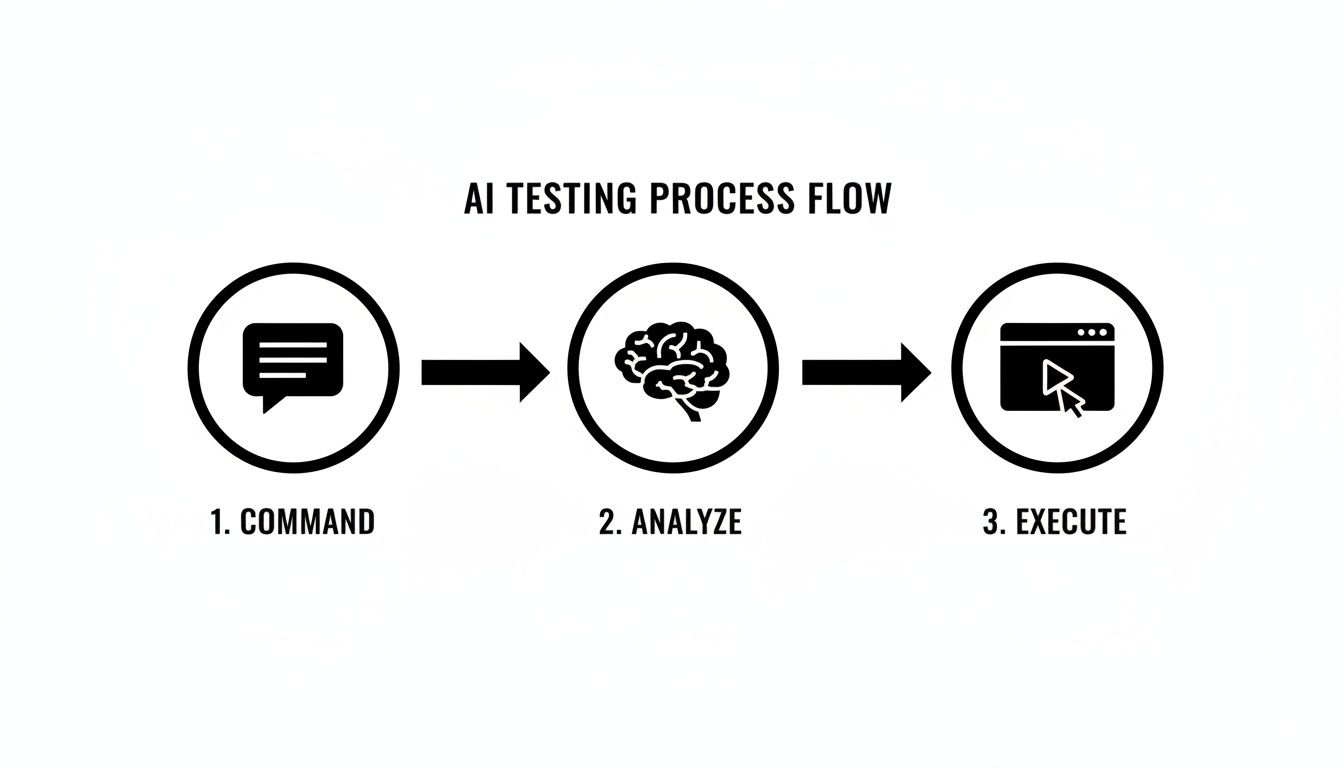
This simple flow tears down the coding barrier, making testing genuinely accessible to everyone, not just the developers.
Empowering the Whole Team
In Australia, this kind of accessibility is more important than ever, with a 22% skills shortage currently impacting QA roles. Tools that use natural language e2e testing can slash training time by an incredible 80%, giving your existing manual testers the power to contribute directly to the automation suite.
As cloud spending in Australia continues to climb, the need for efficient and robust testing only grows. For startup founders, this approach can mean shipping MVPs up to 3x faster—a massive advantage when you’re trying to get ahead. You can read more about the examination of large language models in technology to understand the broader context.
Common Questions About AI-Driven Testing
Adopting any new technology comes with a healthy dose of scepticism, and shifting towards AI-driven quality assurance is no exception. It’s only natural to have practical questions about reliability, complexity, and the skills your team needs before you dive in. Let's tackle some of the most common concerns head-on.
Is This Reliable Enough for Production?
The first question is always about trust: can you really rely on an AI agent in a production-critical pipeline? It’s a fair point. Traditional tests break because they lean on rigid CSS selectors, but AI agents take a more resilient, multi-layered approach. They combine visual analysis, DOM inspection, and text recognition to get a complete picture of what’s happening on the screen.
This method makes the tests far less brittle. For instance, if a developer changes a button's ID but its text and position stay the same, the AI is smart enough to find and interact with it correctly. No more false alarms. That built-in adaptability is precisely what makes it so reliable.
How Does It Handle Complex Applications?
Modern web apps are all about dynamic content and single-page applications (SPAs). So, can an AI actually keep up with content that loads asynchronously? Absolutely, and it does so without any special instructions.
The underlying models have been trained on countless modern web interfaces, so they inherently understand that pages are rarely static.
The AI agent naturally waits for elements like data grids or modals to appear before trying to interact with them, just like a human would. This gets rid of all those clunky 'wait' or 'sleep' commands that developers hate writing and which are a notorious cause of flaky tests.
What Skills Does My Team Need?
This is where things really change, and for the better. The most important skill for writing natural language e2e tests isn't coding—it's having a deep understanding of the product's user journeys.
This opens up the entire testing process. Suddenly, non-engineers like product managers, UX designers, and manual QA specialists can contribute directly to the automation suite. They can take their expert domain knowledge and write effective tests that validate how real people actually use the application.
Ready to stop maintaining brittle scripts and ship faster? With e2eAgent.io, you can write robust tests in plain English and let AI handle the execution. Start your free trial today and transform your approach to quality assurance.