If you're part of a small team, you know the grind of maintaining test scripts. Powerful tools like Cypress and Playwright are incredible, but they can lock you into a frustrating cycle: a developer pushes a minor UI tweak, and suddenly you're spending your Monday fixing a dozen broken tests. This is where AI-based test automation changes the game entirely. It moves us away from brittle, hard-coded scripts and towards simple, plain-English instructions.
Moving Beyond Brittle Scripts
We’ve all been there. You come in after the weekend only to find your test suite bleeding red because a developer innocently renamed a button ID. That’s the reality of brittle scripts. Traditional test automation hinges on hyper-specific selectors—like a button’s CSS class or ID—to find and interact with elements on a webpage. This method works, but it's incredibly fragile.
Think of a traditional script as giving a robot a set of rigid, step-by-step commands: "Walk three steps forward, turn exactly 90 degrees left, extend your arm 50 centimetres, and press the button labelled id='submit-btn-v2'." If that button’s ID changes to id='submit-v3' or its position shifts, the robot gets stuck. The test fails, even though a human user wouldn't even notice the change.
The AI Agent Analogy
So, how does AI do it differently? Instead of giving it rigid code, you give it a goal, just like you would a person. You tell it, "Log in as a new user and check for the welcome message on the dashboard."
The AI agent doesn't care about the specific ID of the login button. It uses computer vision and natural language understanding to look at the screen, identify what looks like a login button, and click it. It understands intent.
This makes the tests far more resilient. This shift is becoming critical, especially when you consider that over 68% of Australian companies plan to integrate AI into their products by 2026, with the tech sector leading the charge at 78%. This isn't just a trend; it's fundamentally changing how we approach software testing by cutting down on maintenance and speeding up release cycles. You can dig into more details about this AI trend in Australia in this PwC report.
AI-based testing isn’t about replacing testers. It’s about giving them superpowers. It automates the soul-crushing task of script maintenance, freeing up your team to focus on what actually matters: delivering an amazing user experience.
Solving Key Pain Points for Small Teams
For startups and small businesses that need to ship features fast, the benefits are huge. Traditional frameworks require engineers with specialised coding skills and a lot of time to maintain the test suite—two things that are usually in short supply.
AI-driven tools, on the other hand, open up testing to everyone. Product managers, manual testers, and even designers can write and understand tests without writing a single line of code. This makes it far simpler to check that an application is behaving as expected. You can learn more about this core concept in our guide to what is functional testing.
This approach brings a few key advantages to the table:
- Drastically Reduced Maintenance: Tests have a "self-healing" ability, meaning they can automatically adapt to small UI changes without breaking. This single feature can save your team countless hours.
- Faster, More Agile Cycles: You can build and run tests much more quickly, get instant feedback in your CI/CD pipeline, and ship new features with confidence.
- Clearer Collaboration: When tests are written in plain English, they become living documentation. Developers, product owners, and stakeholders can all read them and understand exactly how the application is supposed to work.
Comparing Traditional Scripts with AI Automation
To make it crystal clear, let's break down the differences. Here's a quick look at the key differences in approach, maintenance, and skills required between traditional frameworks and modern AI-driven solutions.
| Aspect | Traditional Frameworks (e.g., Playwright, Cypress) | AI-Based Test Automation |
|---|---|---|
| Test Creation | Requires writing code using specific selectors (IDs, CSS, XPath). | Uses plain English commands to describe user actions and goals. |
| Maintenance | High. Tests are brittle and break easily with UI changes. | Low. AI adapts to most UI changes automatically ("self-healing"). |
| Required Skills | Strong coding and framework-specific knowledge (e.g., JavaScript, TypeScript). | No coding required. Anyone can write tests. |
| Resilience | Low. Highly dependent on a stable DOM structure. | High. Understands user intent and visual context, not just code. |
| Speed to Value | Slower. Requires significant setup and ongoing script maintenance. | Faster. Tests can be created quickly with minimal setup. |
Ultimately, the choice depends on your team's goals, but for small teams focused on speed and efficiency, the advantages of an AI-driven approach are becoming too significant to ignore. It fundamentally changes the cost-benefit analysis of test automation.
How AI Agents Actually Test Your Application
The idea of telling a machine to "log in as a new user" in plain English might sound a bit like science fiction. But it's not magic. It's the practical application of two core AI technologies working together: Natural Language Processing (NLP) and Computer Vision. This duo lets an AI agent understand your instructions and "see" your application just like a person would.
First up is NLP, which essentially acts as a translator. When you write a test case in plain English, the NLP engine deconstructs your sentences to figure out the intent. It pinpoints the action ("click," "type," "verify") and the target element ("the login button," "the email field," "the welcome message"), turning your natural language into a structured plan the machine can execute.
This is a huge departure from traditional scripted testing. With tools like Cypress or Playwright, you’re forced to define every step with precise code. With AI-based test automation, you just focus on what you want to test, not the nitty-gritty of how to do it.
Seeing the Web Like a Human
Once the AI figures out what you want, computer vision kicks in. This is where the real resilience comes from. Traditional automation is almost entirely dependent on the Document Object Model (DOM)—the code structure of a webpage. A script might be hard-coded to find a button with a specific locator, like id="submit-v3". The moment a developer changes that ID to id="submit-v4", the test breaks. It's incredibly fragile.
An AI agent, on the other hand, doesn't really care about the DOM. It uses its "eyes"—computer vision—to visually scan the page for something that looks like a login button. It recognises shapes, colours, text labels, and its position on the page, just as you or I would.
This flow shows how testing has evolved from brittle, code-based scripts to intelligent, AI-driven testing that understands the user interface visually.
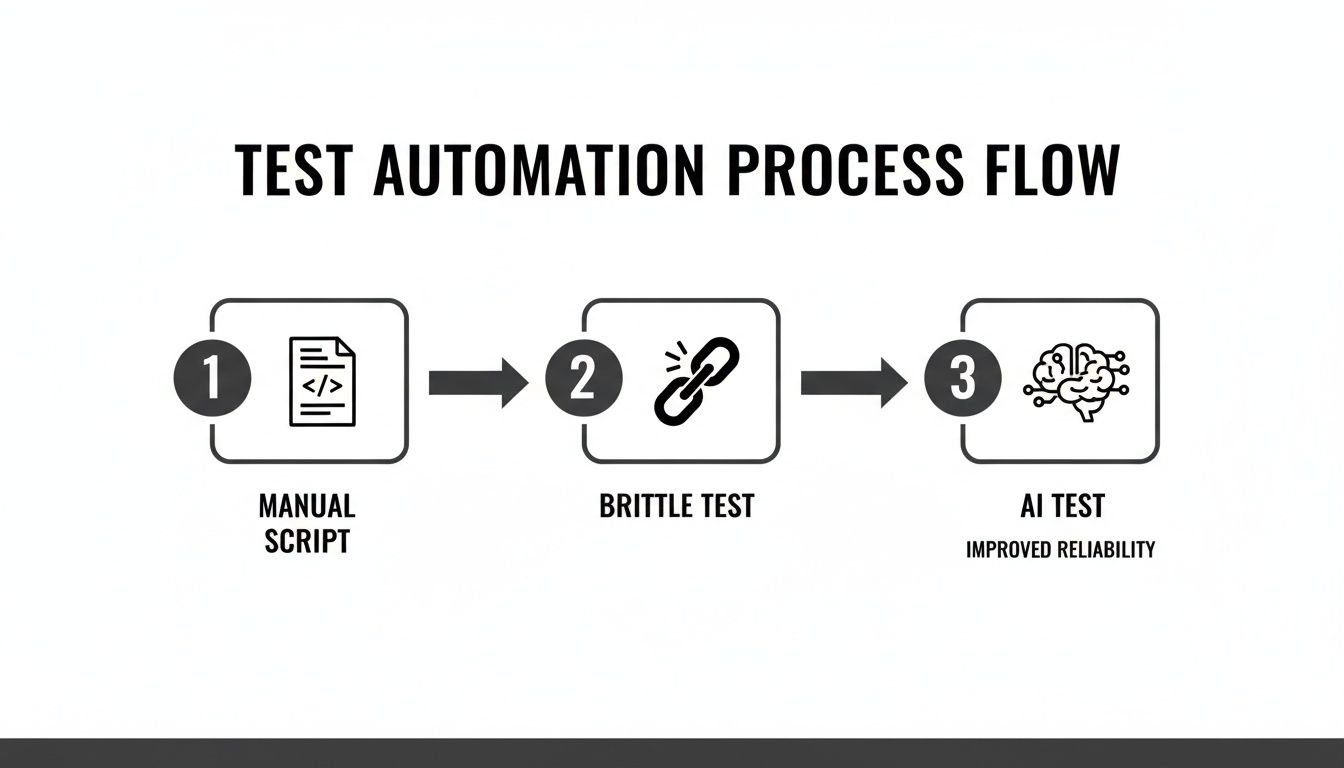
By focusing on visual understanding rather than rigid code, AI-powered tests sidestep the brittleness that plagues traditional automation.
The Power of Self-Healing Tests
This combination of NLP and computer vision is the secret sauce behind self-healing tests. When the user interface changes—and it always does—the AI doesn't just fall over. It adapts.
Let's walk through a classic scenario:
- Initial State: A test is written to "Click the 'Sign Up Now' button." The AI learns this button is blue, rectangular, and sits at the top right of the page.
- UI Change: A designer decides to A/B test a new call-to-action. The button's text is changed to "Get Started Free," its colour is now green, and it's moved to the centre of the screen.
- Traditional Test: A scripted test would fail instantly. Its CSS selector or XPath is now invalid, and the test run stops dead.
- AI Test: The AI agent scans the page, notices the old button is gone, and intelligently looks for the next best match based on visual cues and context. It correctly identifies the "Get Started Free" button as the new target and continues the test, often without needing any human intervention.
This adaptive capability is precisely why AI-based test automation slashes maintenance time. Instead of your engineers constantly fixing broken locators, they can get back to building features. The AI simply handles minor UI tweaks on its own.
This visual and contextual understanding means your tests are no longer shackled to the ever-changing nature of front-end code. They are tied to the user experience itself, which is far more stable. It’s a fundamental shift that makes your entire quality assurance process more robust and efficient, without slowing down your development velocity.
Putting AI Testing into Practice with Real Examples
Theory is great, but let's get our hands dirty. Seeing AI-based test automation in action is where the penny really drops. Forget wrestling with code; you're essentially just having a conversation with a testing agent in plain English, telling it what a user would do.
Let's walk through a few common scenarios to see just how much simpler this makes things, even for really complex user journeys.

We’ll start with the basics—a test every app needs—and then ramp up to something more involved. The big shift here is moving from writing rigid code to describing user intent.
Example 1: The Simple User Login
The login flow is your app's front door, so it absolutely has to work. This makes it the perfect starting point.
Plain English Test Command:
- Navigate to the login page.
- Enter "[email protected]" into the email field.
- Type "SuperSecret123!" into the password field.
- Click the "Log In" button.
- Verify that the text "Welcome, Test User!" is visible on the dashboard.
What the AI Agent is Doing: Under the hood, the AI agent is using computer vision and language processing to figure this out. It doesn't need a specific CSS selector for the "Log In" button. It scans the page, finds what looks like a login button, clicks it, and then moves on to check that the welcome message appeared. Simple as that.
Example 2: The Complex SaaS Onboarding Flow
Right, let's try something more advanced. Onboarding new users often means multiple steps, filling out forms, and maybe even hopping over to an email inbox. Trying to script this traditionally can be a real headache and super brittle.
Plain English Test Command:
- Go to the signup page and fill in the form with a new user's details.
- Submit the form and expect to see a "Please verify your email" message.
- Check the new user's email inbox for a message with the subject "Welcome to Our App!"
- Click the verification link inside the email.
- Confirm you are redirected to the user dashboard.
- Verify the "Getting Started" guide is visible on the page.
What the AI Agent is Doing: This is where you see the AI's smarts kick in. It can intelligently find form fields by their labels ("First Name," "Company Size"). After the form is submitted, it can actually connect to an email service, read the verification email, pull out the unique link, and open it—all without you writing a single line of custom integration code. Finally, it confirms everything looks right on the dashboard.
This is where the power of describing intent becomes obvious. You aren't coding the logic for email parsing or multi-page navigation; you're simply stating the user's goal. The AI handles the complex execution.
Example 3: The Dynamic E-commerce Checkout Process
E-commerce checkouts are notoriously tricky to automate. You've got dynamic content, third-party payment gateways, and unpredictable loading times to deal with. This is exactly the kind of variability AI-based test automation is built for.
Plain English Test Command:
- Search for "Wireless Headphones" and add the first result to the cart.
- Navigate to the checkout page.
- Fill in the shipping details.
- Select "Express Shipping" and verify the total price updates correctly.
- Enter dummy credit card information into the payment fields.
- Click "Place Order" and confirm the "Order Successful" confirmation page appears.
What the AI Agent is Doing: The AI’s visual understanding is the hero here. It can spot and interact with third-party payment fields (like a Stripe or PayPal element) even when they are in a separate iframe—a classic roadblock for scripted tests. It also handles dynamic content gracefully. If the express shipping cost changes, the AI can still validate that the total price was updated without being tied to a hard-coded value.
This resilience makes testing complex, real-world user journeys far more reliable and a whole lot faster to set up.
Integrating AI Automation into Your Workflow
Writing intelligent tests is a great start, but it's only half the story. You unlock the real power of AI-based test automation when it becomes a seamless, almost invisible part of your development rhythm. By integrating these tests directly into your workflow, you get instant, reliable feedback on every single code change. This shifts quality assurance from being a separate, final stage to something that happens continuously.
The practical way to do this is by plugging your AI tests straight into your Continuous Integration and Continuous Deployment (CI/CD) pipeline. It doesn't matter if your team uses GitHub Actions, GitLab CI, or Jenkins; the goal is always the same. Every time a developer pushes new code, your entire test suite should run automatically. Think of it as a safety net that catches bugs minutes after they’re created, not weeks later when a manual tester finally gets to it.

For a small team that needs to move quickly, this immediate feedback is a massive advantage. Developers don't have to wait around for a QA engineer to check their work; they know right away if their changes accidentally broke a critical user journey.
Setting Up Your Pipeline for Success
Getting AI-based tests running in a pipeline follows a familiar pattern, but with a few welcome simplifications. Usually, it just involves setting up a YAML file or using a visual pipeline builder to add a step that executes your tests.
Here’s what that flow typically looks like:
- Code Commit: A developer pushes a change to a branch in your code repository (like Git).
- Pipeline Trigger: The CI/CD tool spots the push and kicks off a new automated workflow.
- Build and Deploy: The latest version of your application is built and deployed to a temporary test environment.
- Execute AI Tests: A simple command triggers your AI test suite to run against that freshly deployed environment.
- Report Results: The AI testing tool sends back a clear pass or fail status to the pipeline.
Because the tests are written in plain English, anyone on the team can glance at the pipeline logs and understand exactly what went wrong. This transparency empowers developers to truly own the quality of their code.
The core idea is to treat your tests like any other automated check. A failed test should block a deployment, preventing regressions from ever reaching your users. This makes intelligent automation a fundamental part of your team's development culture.
Managing Environments and Secrets Securely
A solid CI/CD integration depends on handling test environments and sensitive data properly. You definitely don't want to run tests against your live production database or, even worse, expose API keys in your pipeline scripts.
A couple of best practices here are non-negotiable:
- Isolated Test Environments: Spin up a clean, isolated environment for every single test run. This could be a Docker container or a dedicated staging server. It ensures your tests are consistent and don't trip over each other.
- Secure Secret Management: Use the built-in secrets management tools from your CI/CD platform, like GitHub Secrets or GitLab CI/CD variables. These let you securely store credentials and API keys, which are then safely injected into the test environment only when needed.
AI-Powered Reporting for Faster Debugging
Modern AI testing tools deliver much more than a simple pass/fail. They generate rich, actionable reports that are specifically designed to help developers fix problems fast. These reports often come packed with screenshots for each step, video recordings of the entire test run, and detailed logs explaining what the AI agent "saw" and did. For a deeper look, you can explore platforms like https://e2eagent.io that specialise in this AI-driven approach.
This visual evidence is a game-changer. Instead of trying to reproduce a bug from a vague text description, a developer can just watch a video of the exact moment the test failed. They can see what was on the screen and pinpoint the problem in minutes, not hours. It’s this rapid feedback loop that helps your team release features with more confidence and at a much faster pace.
Your Roadmap for Adopting AI Testing
Switching from manual testing or flaky scripts can feel like a massive undertaking, especially for a small team where every hour is precious. But here’s the thing: adopting AI-based test automation doesn't have to be a disruptive, all-or-nothing project. The trick is to start small, prove the value, and build momentum.
This roadmap gives you a practical, low-friction path to getting real results without derailing your current workflow. It’s all about being strategic—focus on high-impact areas first and expand your automated test coverage from there.
Phase 1: Start with a Pilot Project
The biggest mistake I see teams make is trying to automate everything all at once. It’s a recipe for burnout and creates the perception that the whole initiative has failed before it’s even begun.
Instead, pick just one critical user journey for a pilot project.
So, what makes a good candidate for a pilot?
- High-Value Flow: Choose a workflow that directly impacts revenue or user success. Think user registration, a core feature onboarding, or the checkout process.
- Frequently Used: Automating a path that users take every single day gives you the most consistent feedback and the biggest return on your time.
- Relatively Stable: While AI is great at handling change, your very first test should be on a part of the app that isn’t in the middle of a major redesign.
The goal here is simple: get one important test running automatically. That single win will demonstrate the tool's value to your team and build the confidence you need to keep going.
Phase 2: Build Out Your Core Test Suite
Once your pilot test is running smoothly and reliably, it’s time to expand. Identify your top five to ten most critical user flows. Don’t get bogged down in obscure edge cases just yet; focus on the "happy paths" that the majority of your users follow.
As you write these new tests in plain English, concentrate on clarity and intent. Avoid being vague. Instead of "Check the user profile," a much better instruction is "Verify the user's name and email address are displayed correctly on the profile page."
Think of your test suite as living documentation. A new team member should be able to read through your tests and understand exactly how your application is meant to work, with no extra context needed.
This kind of agility is essential in a fast-moving market. In Australia's tech industry, which is projected to hit $172.3 billion in spending by 2026, AI-driven testing is a significant advantage. Using cloud-native testing with AI can lead to 10x faster cycle times and cut infrastructure costs by a whopping 60-70%—a game-changer for startups and small teams. You can read more about these automation testing trends in Australia.
Phase 3: Establish a Consistent Rhythm
With a core suite of tests in place, the final step is to weave them into your natural development rhythm. This means integrating them directly into your CI/CD pipeline so they run automatically on every code change. This gives your developers immediate feedback, catching bugs just moments after they’re introduced.
Get into a regular habit of reviewing and maintaining your tests. A good practice is to set aside a little bit of time each week or sprint to:
- Review Failed Tests: Quickly figure out if a failure is a real bug or just the result of a planned UI change.
- Add New Tests: As you ship new features, make writing the corresponding automated test a standard part of your "definition of done."
- Refine Existing Tests: Tweak test descriptions for better clarity as your application evolves.
By following this phased approach, you can introduce AI-based test automation in a completely manageable way. You'll start delivering value in days, not months, and build a robust safety net that allows your team to ship features faster and with far more confidence. To learn more about testing strategies, you can also explore other articles on our E2E Agent blog.
Of course. Here is the rewritten section, crafted to sound like it was written by an experienced human expert.
Your AI Test Automation Questions, Answered
Making the leap to AI-based test automation is a big move, and it’s smart to have questions. It’s a totally different way of thinking compared to the scripted world of traditional frameworks. You’re probably wondering how it handles real-world complexity, what it means for your team, and if it can actually keep up as your product grows.
Let's dive into some of the most common questions we hear. My goal is to give you direct, practical answers without the fluff.
How Does AI Testing Handle Dynamic and Complex UIs?
This is where AI automation really comes into its own. We’ve all felt the pain of traditional scripts breaking because of a tiny UI change. They rely on rigid code selectors, so when a developer changes an element's ID for an A/B test or a new feature, the test fails. It’s a constant, frustrating cycle of maintenance.
AI-based systems work differently. They use a blend of computer vision and contextual understanding to see the application more like a human user does.
Instead of searching for a specific id='submit-button', the AI agent visually scans the page for something that looks and behaves like a submit button in that specific context. It understands the page structure, which allows it to adapt when layouts, labels, or styles change.
This visual-first approach is just fundamentally more resilient. It’s designed for the reality of modern web apps, where the UI is always in flux. The AI focuses on what the user is trying to do, not on fragile implementation details.
Does This Replace Our QA Engineers?
Absolutely not. It makes them more powerful. There’s a common myth that AI will make QA roles obsolete, but what we see in practice is the exact opposite. It elevates them by taking the most tedious, repetitive, and soul-crushing parts of the job off their plate.
Think of it as the ultimate force multiplier for your QA team. Instead of spending their days writing and debugging brittle test code, they can redirect their energy to high-impact activities that truly require human insight.
This frees them up to focus on:
- Designing smart test strategies that cover the end-to-end user experience.
- Performing exploratory testing to uncover those weird edge cases and usability quirks that scripts always miss.
- Thinking critically about product quality and collaborating with developers to make meaningful improvements.
At the end of the day, AI-based test automation helps turn great manual testers into automation strategists, without forcing them to become senior developers. It lets your experts get back to what they do best: ensuring your product is exceptional.
What Is the Learning Curve for a Team Used to Cypress?
Honestly, the learning curve is surprisingly gentle. For engineers who are already comfortable with tools like Cypress or Playwright, the biggest shift is in mindset. You have to stop thinking in code and start thinking in user intent.
Instead of wrestling with complex selectors to find a specific element, you just describe what the user needs to achieve. The AI handles the "how." It’s a liberating change that dramatically cuts down the time it takes to create a test.
And for non-technical team members, like product managers or manual QA analysts? The barrier to entry is practically zero. If you can write a user story or a bug report in plain English, you can write an automated test. Most teams are up and running in a single afternoon, building out tests for their most critical user flows.
How Does This Approach Scale as Our Product Grows?
Scalability is a massive strength here, especially when you think about the technical debt that plagues traditional test suites. As an application gets bigger, scripted test suites often become a maintenance nightmare. Every small UI tweak can set off a cascade of failures.
An AI-based system scales far more gracefully for two main reasons:
- Self-healing absorbs change. When a developer renames a button or moves a form, the AI usually just adapts on the fly without anyone needing to update the test. This built-in resilience slashes the maintenance burden as your product scales.
- Plain-English tests are easy to maintain. Because tests are written in natural language, new team members can pick them up, make updates, and add new ones with very little friction. You avoid creating a complex test codebase that only a handful of senior engineers can touch.
This creates a sustainable test suite that actually grows with your product instead of becoming a bottleneck. It helps your quality process keep pace with development, no matter how fast you’re shipping.
Stop maintaining brittle Playwright and Cypress tests and start shipping with confidence. With e2eAgent.io, you just describe your test scenarios in plain English, and our AI agent handles the rest. Discover how you can build a reliable test suite in hours, not weeks, at e2eAgent.io.