Imagine you could hire a digital assistant to perfectly replicate how a real person uses your app. One that works 24/7, never gets tired, and never makes a mistake. That’s essentially what modern browser automation offers—it looks like an engineering task, but it's really a secret lever for business growth.
Why Browser Automation Is Your Secret Weapon
In the constant rush to ship new features, manual testing often becomes the biggest bottleneck. It’s the single thing that slows down innovation and eats up valuable resources.
Teams lose countless hours just clicking through the same user flows over and over, making sure a new update didn't accidentally break an old feature. This kind of repetitive, mind-numbing work isn't just slow and prone to human error; it's incredibly expensive.
Browser automation gets you out of this rut by teaching a machine to handle all those repetitive tasks for you. Think of it as creating a flawless, tireless clone of your most meticulous QA tester. This "digital assistant" can run through hundreds of tests, fill out every form, and validate complex user journeys in a matter of minutes, not days.
Move Faster with Unbreakable Confidence
One of the biggest frustrations with older automation tools was how fragile they were. Traditional scripts were like a house of cards—a tiny, insignificant UI change, like renaming a button's ID, could bring the entire test suite crashing down.
This fragility created a painful cycle: write tests, watch them fail constantly, and then spend more time fixing the broken tests than actually building new features. It often felt like you were taking one step forward and two steps back.
Modern, intelligent automation is built differently. It shifts from rigid, step-by-step instructions to understanding the intent behind an action. The tool knows what you want to do (like "click the login button"), not just how you specifically told it to do it. This resilience gives your team the confidence to deploy changes fast, without worrying that everything will break.
The Strategic Advantage in a Competitive Market
This leap in speed and reliability is a true game-changer, especially for businesses in a crowded market. Here in Australia, the tech sector is booming, with automation testing growing at 12.3% each year. Total IT spending is on track to hit a staggering $172.3 billion by 2026.
For startups and smaller teams, adopting smart automation isn’t just a trend—it's a survival tactic. While older automation scripts fail 30-40% of the time because of simple UI changes, newer AI-powered agents can adapt on the fly. This frees up your developers to focus on what actually matters: creating more value for your customers.
You can get more insights into the latest automation testing trends from KiwiQA.
From Brittle Scripts To Intelligent Agents
Browser automation is undergoing a massive shift. We're moving away from the rigid, code-heavy scripts that have defined testing for years and stepping into a world of more intelligent, resilient automation. For a long time, tools like Cypress or Playwright were the gold standard, requiring developers to write explicit, line-by-line instructions to control a browser.
Think of these traditional scripts as a very literal-minded assistant. They follow a precise set of commands tied to specific elements on a webpage, which we call selectors. A typical command might be, "Click the element with the ID '#user-login-btn'."
This works perfectly well… right up until it doesn't. The moment a developer tweaks the user interface—even a tiny change like renaming that button's ID—the script breaks. This is exactly why they're known as "brittle" scripts. They snap easily and demand constant, often tedious, maintenance. For a small team, this can quickly become a nightmare, with more time spent fixing broken tests than actually building new features.
A Smarter Way to Automate
Now, what if you had an assistant who understood your goal, not just the specific command? That’s the fundamental difference with AI-powered agents. Instead of telling the tool exactly what to click, you describe what you want to achieve in plain English, like, "Click the login button."
The AI agent isn't fussed if the button's ID changes overnight. It uses a deeper understanding of the page's structure and context to figure out which element is the right one and completes the task. This intent-driven approach makes your automation far more durable, finally freeing your team from the endless cycle of script repairs.
This shift towards more intelligent automation has a real impact on business outcomes, boosting everything from development speed to overall confidence in your product.
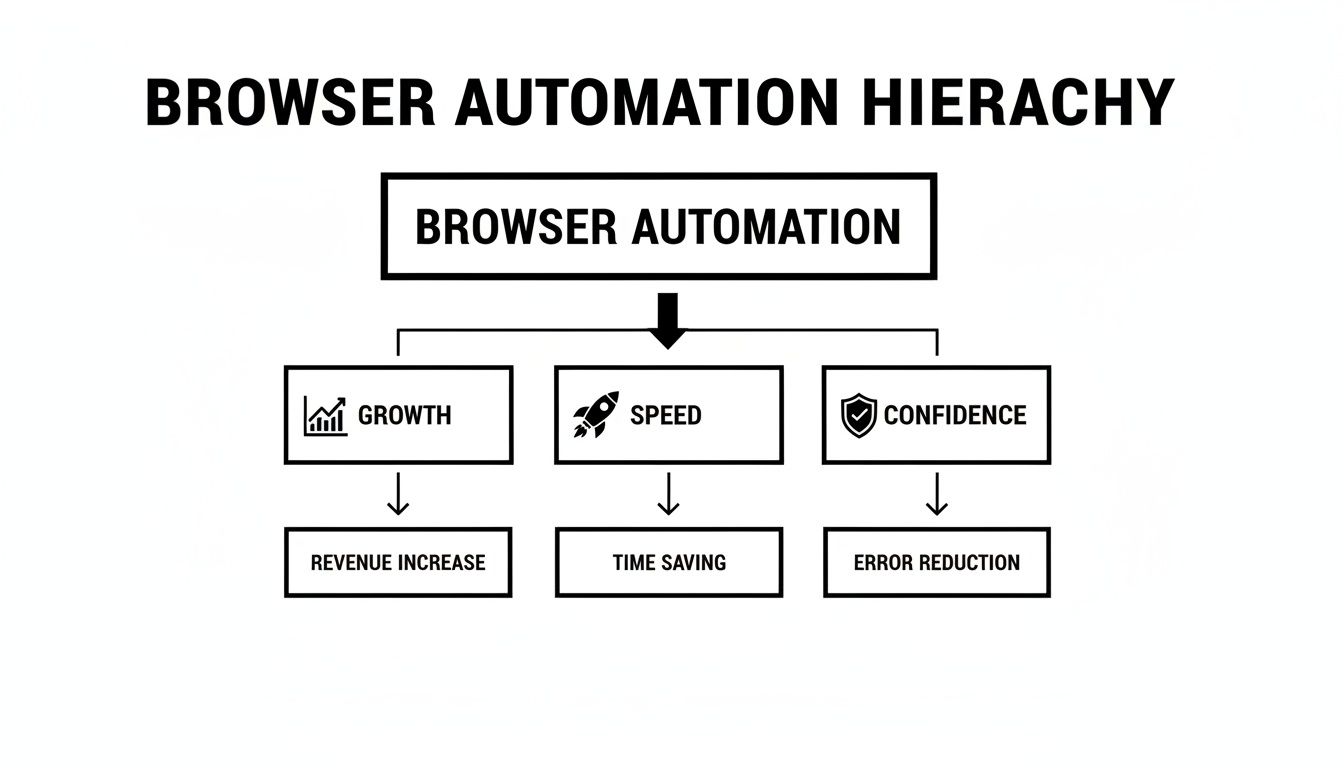
As the diagram shows, building resilient automation is the foundation. It directly leads to faster development cycles and gives teams greater confidence when they deploy new code, which ultimately helps the business grow.
Comparing The Two Approaches
To really see the difference, it helps to put the old and new methods side-by-side. One requires constant gardening and upkeep, while the other is built to adapt on its own.
Traditional Scripts vs AI Agents A Head-to-Head Comparison
Here's a direct comparison of the key aspects that matter most to development teams when choosing an automation strategy.
| Aspect | Traditional Automation (e.g., Cypress, Playwright) | AI-Powered Automation (e.g., e2eAgent.io) |
|---|---|---|
| Maintenance | High. Scripts are brittle and break with minor UI changes, demanding constant updates from your team. | Low. Agents understand user intent and adapt to UI changes automatically, without manual intervention. |
| Resilience | Low. Highly dependent on specific, hard-coded selectors like IDs and class names that often change. | High. Focuses on the user's ultimate goal, not the underlying code structure, making it far more robust. |
| Setup Time | Moderate to High. Requires solid coding knowledge and significant initial time to develop and debug scripts. | Low. Test scenarios can be described in plain English, drastically reducing setup complexity. |
| Skill Requirement | Coding expertise is a must-have to write, debug, and maintain the test suite effectively. | Plain English is all that's needed, making it accessible to non-developers like QAs and product managers. |
This evolution is proving to be a game-changer, especially for teams that need to move fast. For QA leads, adopting tools that manage browser environments better can slash setup time by a massive 70%. In Australia, Western Australia is seeing process automation grow at a 9.2% CAGR, a trend fuelled by the need for reliable browser simulation in demanding sectors like e-commerce. Even indie developers have reported 40% faster release cycles after switching to AI, simply because it handles the complex user interactions that humans often miss.
Ultimately, the goal is to build a reliable safety net for your application. If you’re looking to dive deeper into this shift, you can learn more about the rise of agentic test automation and how it's changing the game.
Understanding How Automation Tools Work

Before you can pick the right tool for browser automation, it helps to peek under the bonnet and see how they actually work. The way a tool "talks" to a browser has a huge impact on its speed, how reliable it is, and what it’s capable of doing.
Most tools rely on one of two main technologies. The first is the WebDriver protocol, the classic standard that made tools like Selenium famous. Think of WebDriver as a formal interpreter in a conversation. Your test script issues a command, WebDriver translates it into a format the browser can understand, the browser does the thing, and WebDriver reports the result back.
This back-and-forth process is incredibly stable and supported by all major browsers. The downside? That translation step introduces a tiny bit of latency. It's like having a conversation through a human translator—it gets the job done reliably, but it's never going to be as quick as speaking the language yourself.
The Direct Line into the Browser
The second, more modern approach is the Chrome DevTools Protocol (CDP). This is the very same protocol that powers the developer tools built right into Google Chrome. Tools like Playwright and Puppeteer tap into CDP to talk directly to Chromium-based browsers (like Chrome and Edge).
If WebDriver is an interpreter, CDP is a high-speed, direct data line plugged straight into the browser’s engine. There's no translation required. This makes automation scripts that use CDP noticeably faster and gives them some serious superpowers, like the ability to listen in on network traffic or perfectly mimic different screen sizes.
The catch is that CDP is a native language for Chromium browsers. While there are workarounds to get it speaking to Firefox and Safari, its full power and most reliable features are found in its home turf—the Chrome ecosystem.
Scaling Automation Without the Headache
No matter which protocol you choose, every team eventually hits the same wall: testing on all the different browsers and devices your users have. A new feature might look perfect on your Mac in Chrome but be completely broken on an iPhone using Safari.
Trying to build and maintain your own in-house "device lab" to cover all these combinations is a costly, time-sucking nightmare. For most small teams, it’s just not practical.
This is where cloud-based testing grids save the day. Services like BrowserStack or Sauce Labs solve this problem beautifully by giving you on-demand access to thousands of real browser and device combinations in the cloud. You can run your automation scripts on pretty much any setup you need, without owning any of the hardware.
For a team that’s growing, this is a game-changer. It means you can:
- Ensure broad compatibility by testing your app where your customers actually use it.
- Run hundreds of tests in parallel, slashing the time it takes to get feedback on a new release from hours to minutes.
- Forget about infrastructure management and let your team focus on building a great product instead of babysitting a server rack.
These platforms level the playing field, giving small teams the kind of powerful testing capabilities that were once reserved for massive companies. They handle all the messy infrastructure, so you can focus on shipping a flawless user experience.
How to Start Automating Your Key User Journeys

Getting started with browser automation can feel like a massive project, but the trick is to think small. You don’t need to boil the ocean and automate every single thing on day one. The real goal is to get a quick win, prove the value, and then build on that momentum.
The best place to begin is by zeroing in on your most critical user journeys. These are the core workflows that your business absolutely relies on. Ask yourself: if something broke, which user path would cause the most damage to our revenue or reputation?
Pinpoint Your Most Valuable Flows
Start by mapping out the handful of user journeys that deliver the most value. For most applications, a few will stand out immediately.
- User Signup and Login: This is the front door to your app. If new users can't get in, nothing else matters.
- Checkout and Purchase Process: For any e-commerce or SaaS business, this workflow is a direct line to your bank account.
- Core Feature “Happy Path”: This is the primary journey a user takes to solve their main problem and get value from your product.
By focusing your initial efforts here, you create a powerful safety net. Every time you ship new code, you can instantly verify that these crucial flows are still working. This gives your team the confidence to move faster without worrying about breaking the most important parts of your app. For a deeper look, check out our guide on how to approach end-to-end testing for these key journeys.
Choosing the Right Tool for Your Team
Once you’ve figured out what to automate, the next question is how. The best tool for the job really depends on your team’s specific situation. A few simple questions can help you narrow it down:
- What skills do we have? Is your team full of developers who are comfortable with coding tools like Playwright, or would a no-code, plain-English solution be a much better fit?
- How much time can we spend on maintenance? Are you ready to constantly tweak and update brittle test scripts, or do you need something more resilient that can adapt to UI changes on its own?
- What’s our budget? Don’t just look at the sticker price of a tool. Remember to factor in the hidden cost of the engineering hours needed to keep it all running.
For small teams, the maintenance burden is often the deciding factor. An AI-first tool dramatically lowers the barrier to entry, allowing anyone on the team to describe a test in plain English and trust the agent to handle the execution. This frees up developers from the endless cycle of fixing broken tests.
This practical approach is becoming essential for Australian startups. The local process automation market is projected to hit AUD 638.89 million by 2025, and AI agents are at the centre of this shift. By 2029, the Australian testing market is expected to reach USD 1.7 billion, making AI-powered tools that verify outcomes without brittle code a must-have for teams who want to avoid maintenance headaches. You can explore more data on the Australian process automation market to understand this trend better.
Integrating Automation Into Your CI/CD Pipeline
Running browser automation tests on your own machine is one thing, but the real magic happens when you weave them directly into your development workflow. By integrating your tests into a Continuous Integration/Continuous Deployment (CI/CD) pipeline, they stop being a manual task and become an automated safety net, catching issues with every single code change.
Think of your CI/CD pipeline as an automated assembly line for your software. When a developer pushes new code, the pipeline kicks off a series of quality checks. Browser automation becomes one of the most critical stations on this line, giving the user experience a thorough shakedown before any code gets near your customers.
This integration means that every new feature or bug fix automatically gets validated against your most important user journeys. It’s the ultimate quality assurance, catching regressions and user-facing bugs within minutes of being introduced, not days or weeks later.
Triggering Automated Test Runs
Getting this up and running is thankfully quite straightforward with modern platforms like GitHub Actions or GitLab CI. The whole process usually starts with a trigger—most often, a developer creating a new pull request or merging code into the main branch.
This event is the signal for the CI/CD server to spin up a fresh, clean environment and get to work. A typical sequence looks something like this:
- Code Push: A developer commits their latest work to the repository.
- Pipeline Trigger: The CI/CD platform (like GitHub Actions) spots the change and starts a new workflow.
- Environment Setup: It builds your application and sets up a temporary, isolated environment just for testing.
- Test Execution: The pipeline then runs your browser automation scripts against the newly built app.
To keep things moving quickly, these tests are often run in a headless environment. This just means the browser runs in the background without a visible user interface, which dramatically cuts down on resource usage and makes the tests finish much faster.
Getting Clear and Actionable Feedback
The final piece of the puzzle is getting clear feedback. A failing test is pretty useless if your team can't quickly figure out what broke. This is where older, script-based tools often create more noise than signal, leaving developers to dig through thousands of lines of cryptic error logs.
Modern browser automation, particularly with AI agents, is designed to give you simple, human-readable results. Instead of a stack trace, you get a clear message: "The test failed because the 'Add to Cart' button was not found on the product page."
This kind of clarity changes everything. The results can be piped directly into your team’s Slack channel or posted as a comment right on the pull request. Developers get immediate, actionable feedback where they're already working. This tight feedback loop helps them fix issues fast, making sure your automated testing actually speeds up your workflow instead of bogging it down. If you want to dive deeper into the basics, our guide to automated software testing covers the fundamentals.
The Future Is Agentic: Stop Maintaining Test Scripts
As we've journeyed through the world of browser automation, a clear pattern has emerged. We started with manual clicks, graduated to fragile, coded scripts, and are now on the verge of something much smarter. We’ve all felt the pain of traditional automation—that never-ending cycle of writing a test script only to watch it shatter with the smallest UI tweak. This isn't just a minor hassle; it's a direct brake on your team's ability to innovate and ship quickly.
The future of quality engineering isn’t about writing slightly more robust test scripts. It’s about not having to write them in the first place. That’s the real promise behind an agentic approach to testing.
Embrace a New Way of Thinking
AI-powered agents are a fundamental shift in how we approach this problem. Instead of feeding a browser a strict set of selector-based commands, you just describe what you want to achieve in plain English. The agent handles the rest, navigating your application with a contextual understanding that makes it resilient to the constant churn of front-end development.
The true cost of brittle automation isn’t just the broken tests. It’s the valuable time your team sinks into fixing them instead of building features your customers will love. Every hour spent debugging a flaky script is an hour stolen from innovation.
This move from code-driven to intent-driven automation is the final piece of the puzzle for truly speeding up your development lifecycle. Take a moment to think about your current process. How many hours a week are lost to test maintenance? By adopting an agentic model, you’re choosing to prioritise reliability and speed, freeing your team to focus on what actually matters.
Frequently Asked Questions About Browser Automation
Jumping into browser automation for the first time usually brings up a few practical questions. Let's tackle some of the most common ones that teams run into, clearing up any lingering doubts and helping you get started.
Can I Start Browser Automation Without Being a Programmer?
You absolutely can. For a long time, the answer to this was a hard "no." Tools like Playwright or Cypress were built for developers and demanded serious coding skills.
But that's old news. Modern AI-powered platforms have completely changed the game, making automation accessible to the entire product team. With "no-code" or "low-code" tools, you can often write test instructions in plain English. This means QA specialists, product managers, and even founders can build solid test suites without touching a line of code, opening the door for everyone to contribute.
How Do I Decide Which User Flow to Automate First?
A great rule of thumb is to start with your most critical, high-traffic user journey. Ask yourself: if one part of our app broke, which failure would cause the most chaos for our users or our business?
It's almost always one of these:
- The user sign-up and login process.
- The complete checkout flow on an e-commerce site.
- The primary "happy path" that delivers your app's main value.
By automating these first, you get the biggest bang for your buck. You're immediately protecting the most valuable parts of your user experience and building a stable foundation to expand your test coverage from.
Is Browser Automation Only for Large Companies?
Not anymore. It used to be that way, for sure. The steep cost of hiring specialised engineers and managing complex testing infrastructure put effective browser automation out of reach for anyone but large enterprises with deep pockets.
Today, things are completely different. Cloud-based platforms and AI-driven tools offer flexible pricing that works for small, fast-moving teams. They handle all the expensive infrastructure for you and slash the ongoing maintenance time, making powerful, reliable automation a realistic goal for any company.
Ready to stop wasting time on brittle test scripts? e2eAgent.io lets you describe tests in plain English while an AI agent handles the rest. See how much faster you can ship by checking out our AI-powered test agent.